Descripción
BUILT SPECIFICALLY FOR
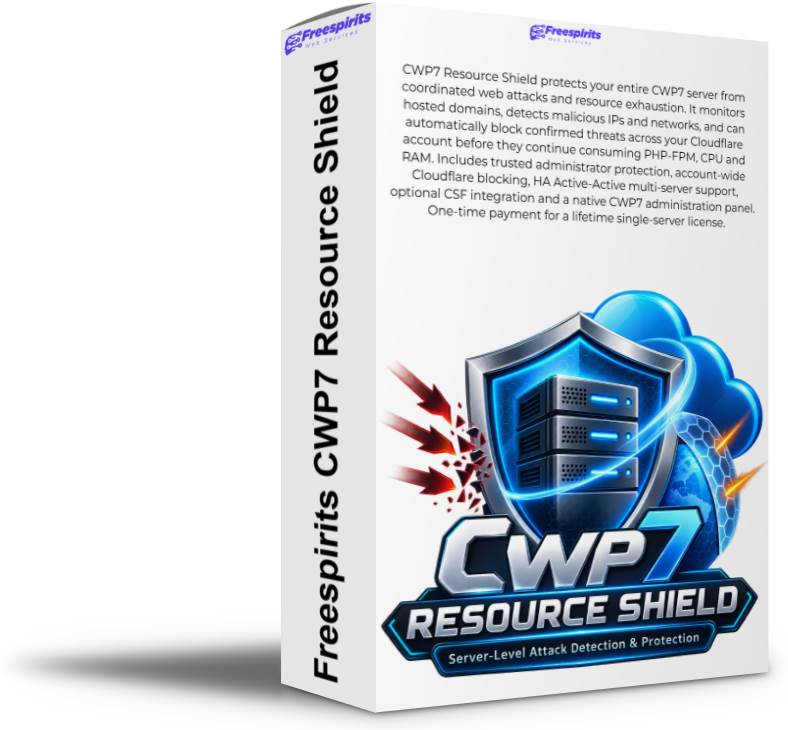
CWP7CWP7 Resource Shield
Servidor-Level Attack Detection, Resource Protection & Automated Cloudflare Defense
Protect the servidor — not just one website. Detect coordinated malicious traffic, identify abusive networks and stop confirmed threats before they repeatedly consume PHP, CPU, RAM and database resources.
✓ Native CWP7 Module
✓ Cloudflare Integration
✓ Network-Level Detection
✓ Multi-Servidor Ready
Why Resource Shield Belongs on a Serious CWP7 Servidor
When one website on a shared servidor comes under attack, the problem rarely stays isolated to that website.
Repeated requests against WordPress login pages, XML-RPC, WooCommerce endpoints, PHP scripts and other expensive URLs can trigger PHP-FPM workers, database queries, plugins, cron jobs and background processes.
Eventually, one compromised or heavily attacked website can begin consuming resources needed by every other customer hosted on the same servidor.
CWP7 Resource Shield is designed to intervene before abusive traffic becomes a servidor-wide resource problem.
The Problem Traditional Website Security Does Not Fully Solve
Imagine alojamiento 20, 50 or 100 websites on a CWP7 servidor.
One WordPress or WooCommerce website suddenly receives hundreds or thousands of automated requests targeting sensitive endpoints:
/wp-admin/
/wp-login.php
/xmlrpc.php
/wp-cron.php
The requests may originate from dozens of different IP addresses and appear individually insignificant.
But many of those IP addresses may belong to the same attacking network.
Without servidor-level intelligence, malicious traffic can continue travelling through your infrastructure until expensive application layers begin processing it.
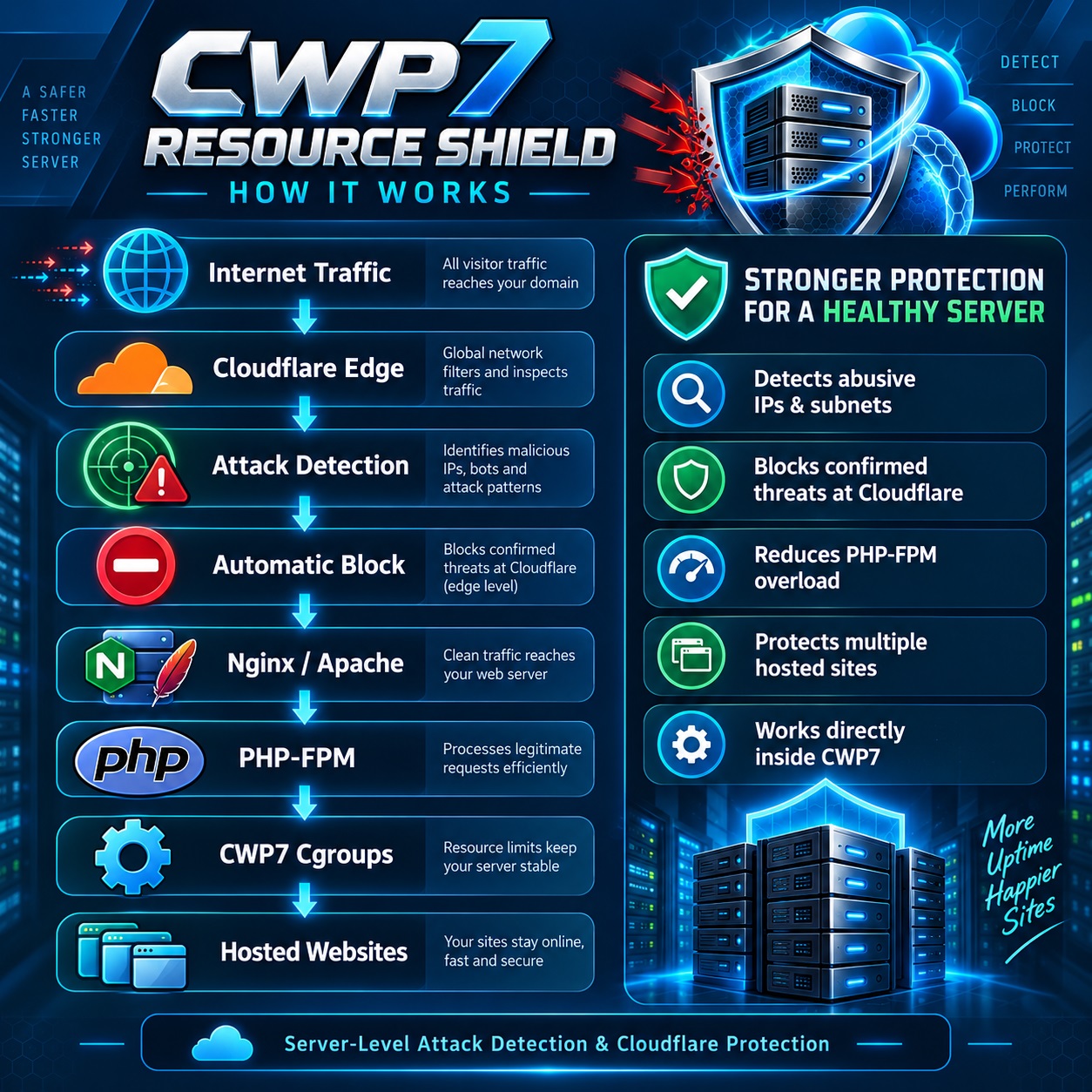
Internet / Cloudflare
↓
Nginx / Apache
↓
PHP-FPM
↓
WordPress / WooCommerce / PHP
↓
MySQL
Once PHP is processing the request, servidor resources are already being consumed.
Resource Shield Changes Where the Battle Happens
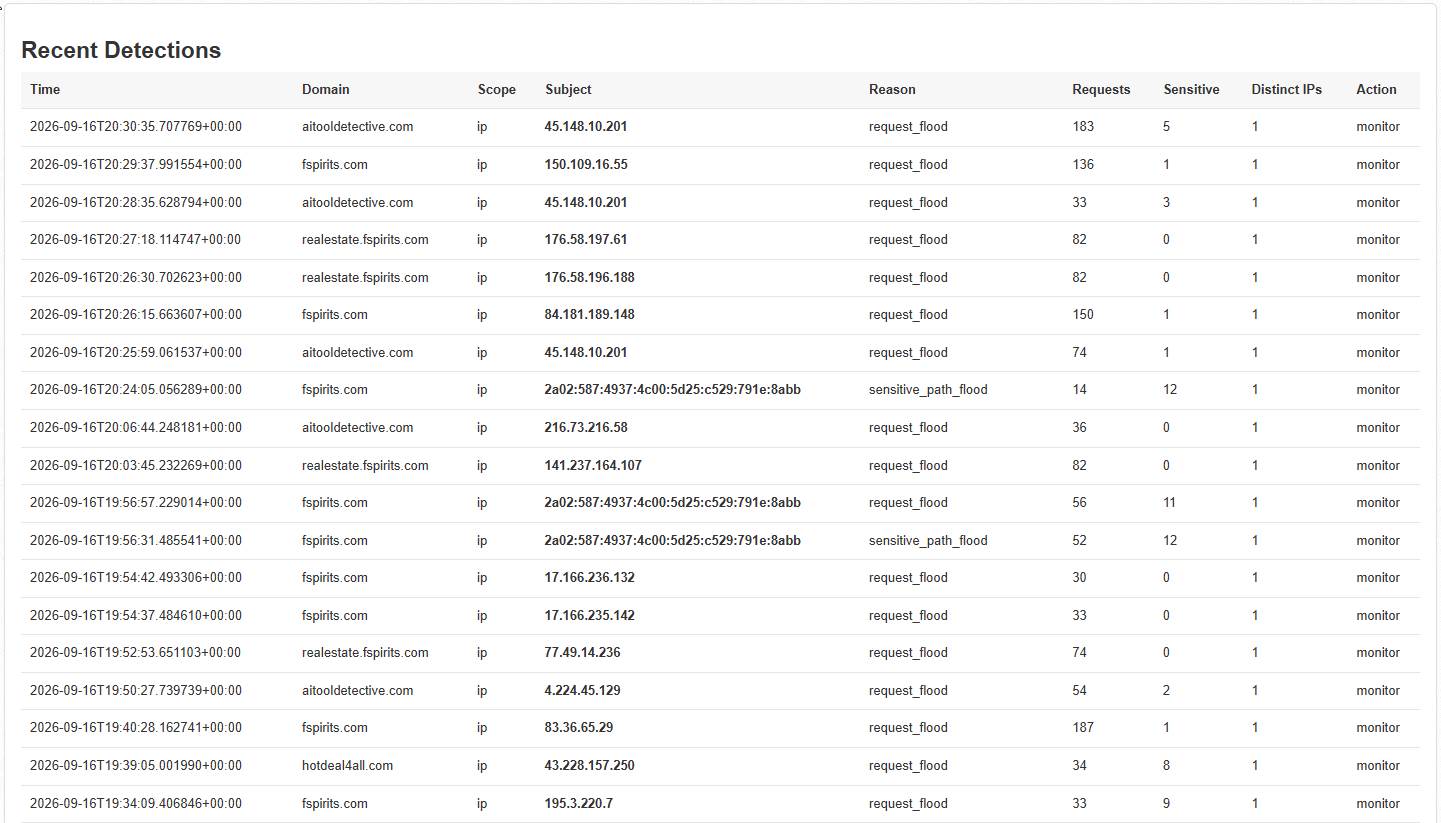
CWP7 Resource Shield continuously analyses relevant servidor traffic and looks for suspicious and coordinated attack behaviour.
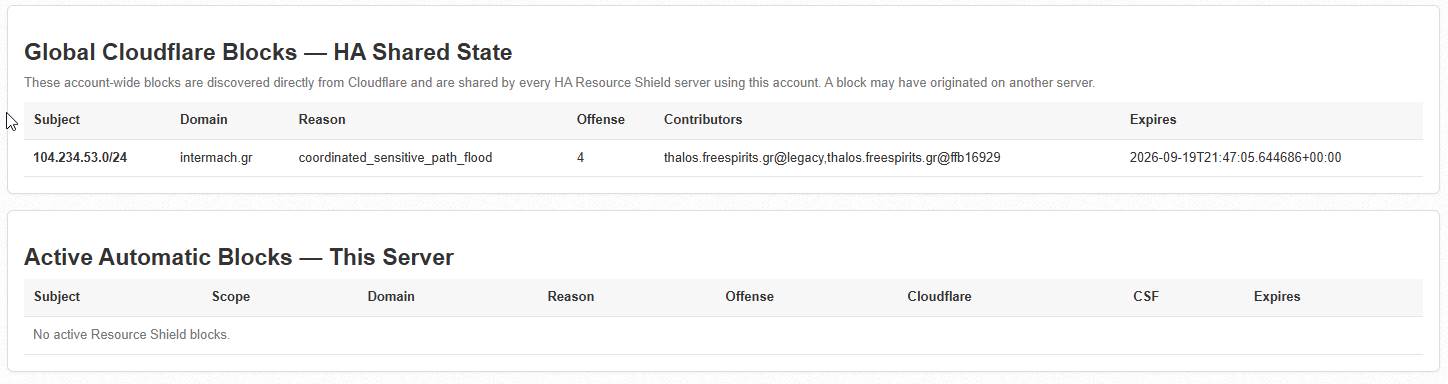
When configured protection criteria are met, the module can push a block outward to Cloudflare.
BLOCK 104.234.53.0/24
Instead of repeatedly allowing the same malicious network to reach Nginx, Apache, PHP-FPM, WordPress and MySQL, confirmed attack traffic can be rejected at Cloudflare’s edge.
One Module. Servidor-Wide Visibility.
🛡 Servidor-Level Protection
Unlike a WordPress security plugin that sees only one installation, Resource Shield operates at the CWP7 servidor level and can monitor activity affecting multiple hosted domains.
☁ Cloudflare Defense
Confirmed malicious IP addresses or networks can be blocked through Cloudflare so subsequent traffic can be stopped before it reaches expensive application layers.
⚡ Resource Protection
Reducing abusive PHP requests helps protect PHP-FPM capacity, CPU, RAM and database resources that legitimate visitors and customers need.
🌐 Network Intelligence
Resource Shield can recognise coordinated behaviour across multiple addresses instead of treating every attacking IP as an unrelated event.
🖥 Native CWP7 Interface
Access Resource Shield directly from the Control Web Panel administrator interface without managing separate WordPress dashboards.
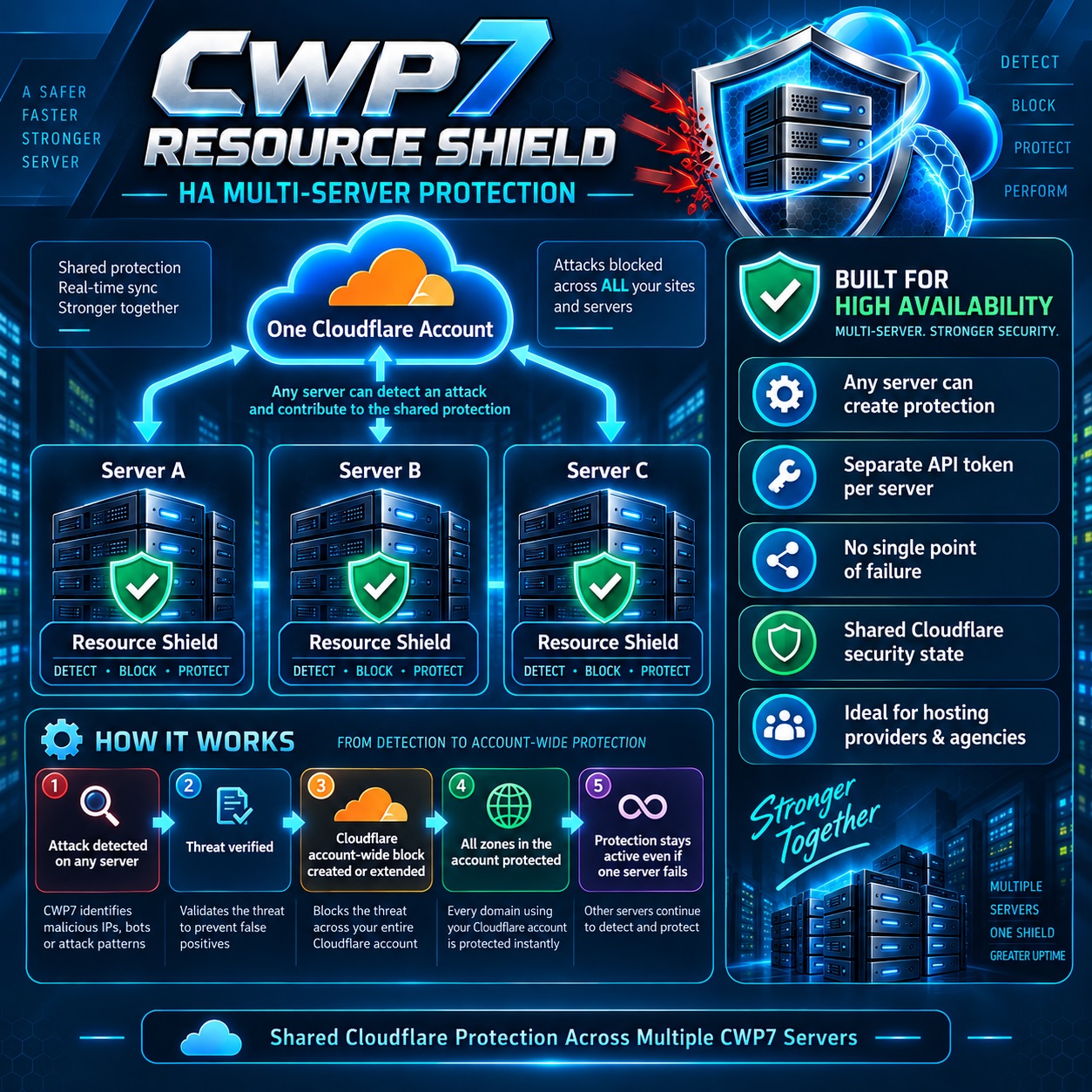
Multiple CWP7 servers can contribute attack intelligence to the same Cloudflare account-wide protection architecture.
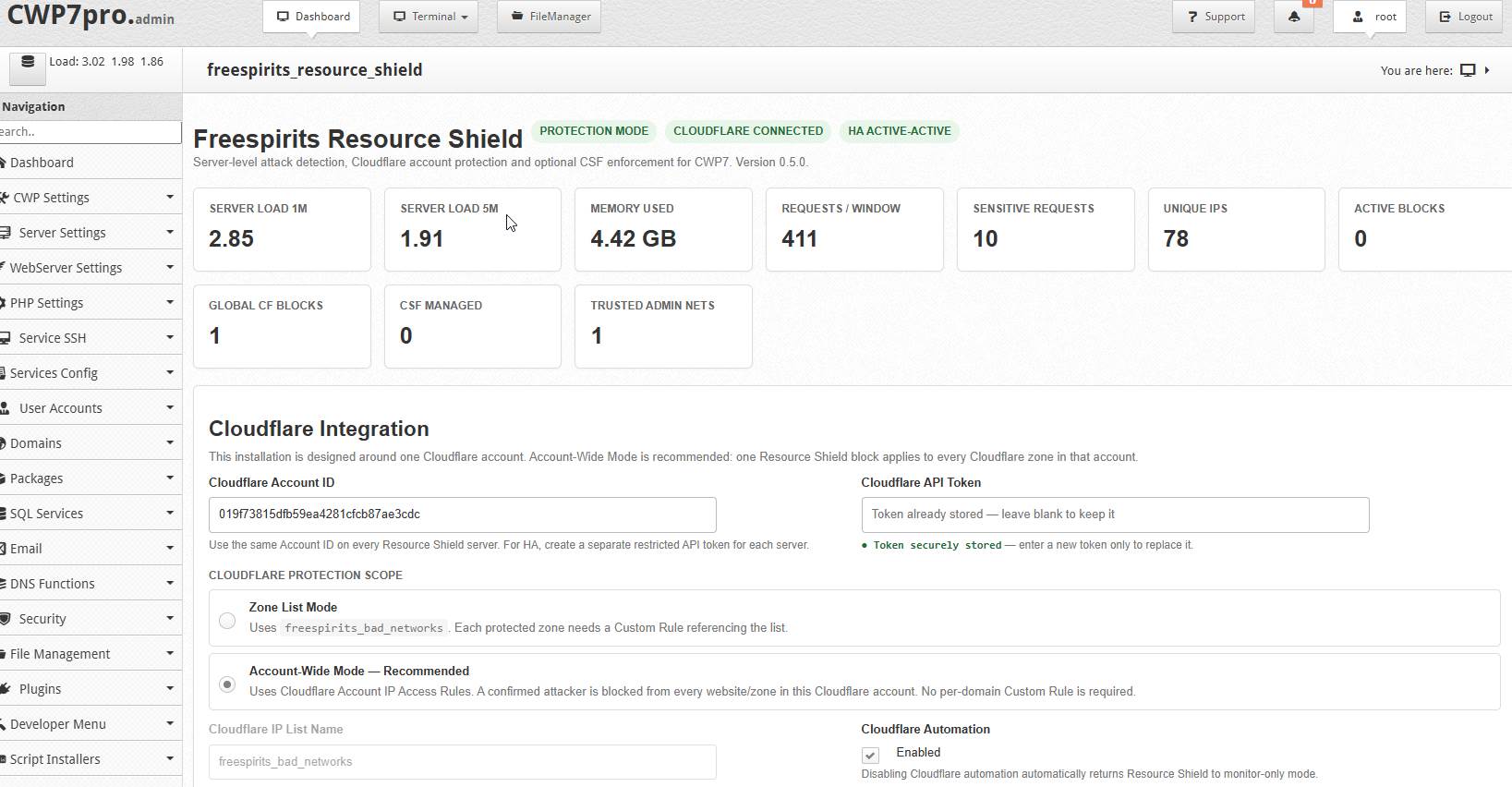
A Central Security View Inside CWP7
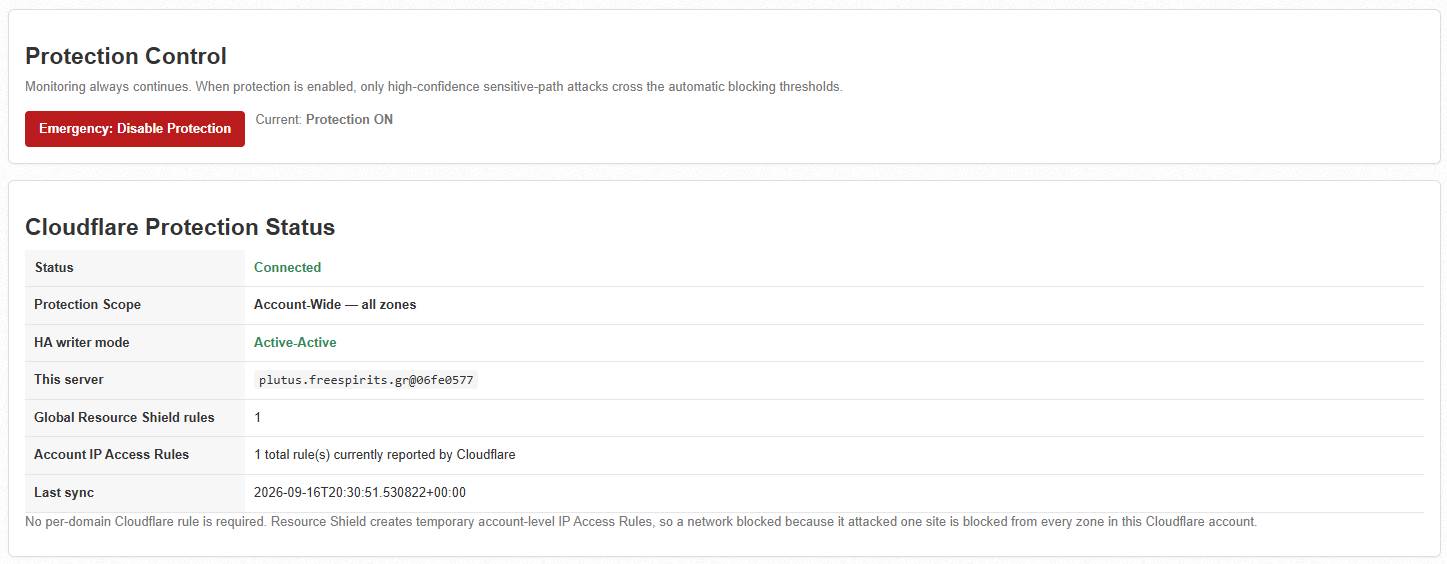
Resource Shield includes its own native CWP administration module, giving administrators fast access to important protection information from one central location.
- Resource Shield status
- Protection mode
- Servidor load
- Requests being analysed
- Sensitive requests
- Unique requesting IPs
- Detected attacks
- Active blocks
- Cloudflare connectivity
- Account-wide protection
- Trusted administrator networks
- HA multi-servidor protection
- Optional CSF integration
- License status
Instead of opening dozens of WordPress dashboards trying to understand why a servidor is struggling, administrators gain a broader view of potentially abusive activity affecting the machine.
Cloudflare Account-Wide Protection
One of Resource Shield’s most powerful capabilities is the ability to turn an attack discovered against one website into protection that can benefit other websites connected to the same Cloudflare account.
shop.example.com
Detected malicious network: 185.123.45.0/24
When Resource Shield creates the corresponding account-level Cloudflare protection, the attacking network can then be prevented from reaching additional protected websites.
An attack detected against one site can become useful security intelligence for the rest of your infrastructure.
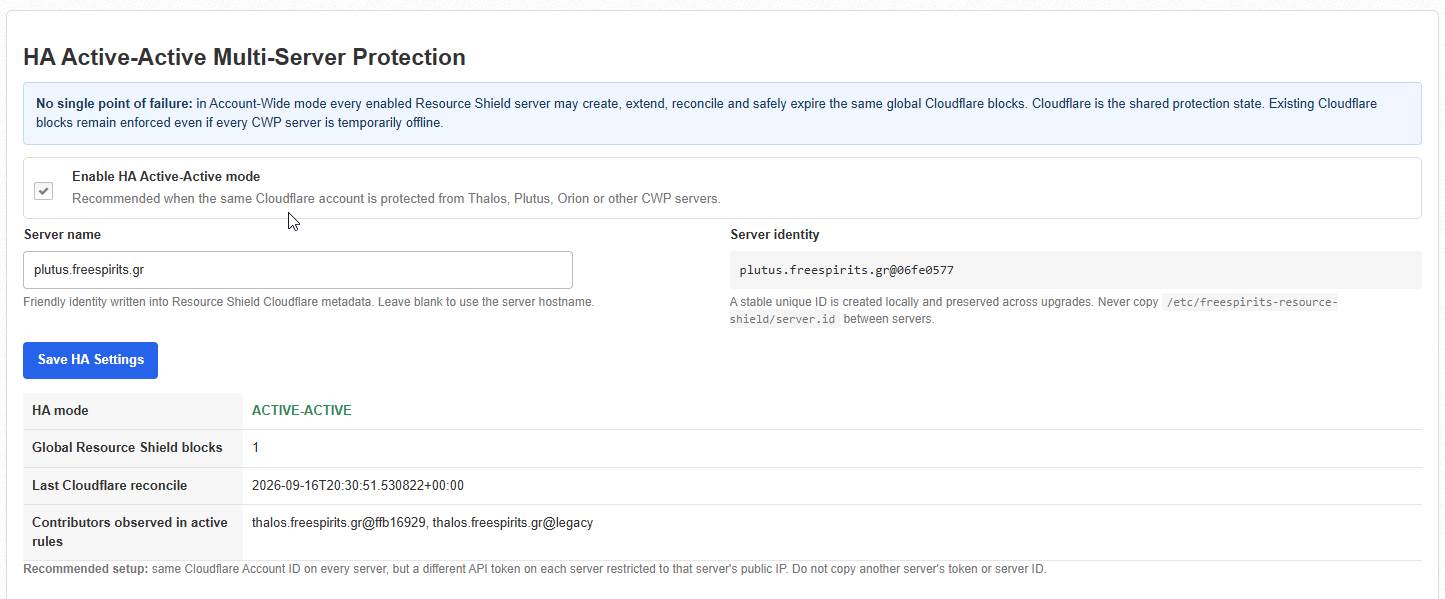
High Availability Active-Active Multi-Servidor Protección
Resource Shield is especially powerful for alojamiento providers, agencies, developers and administrators operating several CWP7 servers.
CLOUDFLARE ACCOUNT
↓
Every participating servidor can independently detect threats and contribute to shared Cloudflare protection.
There is no requirement for one Resource Shield installation to function permanently as a master node.
If one servidor becomes unavailable, Cloudflare blocks that have already been created continue to exist, while other Resource Shield servers can continue detecting new threats.
Stop Chasing Individual IP Addresses
Modern automated attacks frequently rotate through multiple IP addresses.
Blocking only:
104.234.53.11
may have limited effect when the next requests arrive from:
104.234.53.22
104.234.53.63
104.234.53.91
Resource Shield is designed to recognise coordinated behaviour and, when appropriate under its configured protection logic, escalate protection to the corresponding network:
104.234.53.0/24
This can significantly reduce the volume of repetitive attack requests allowed to continue reaching the origin servidor.
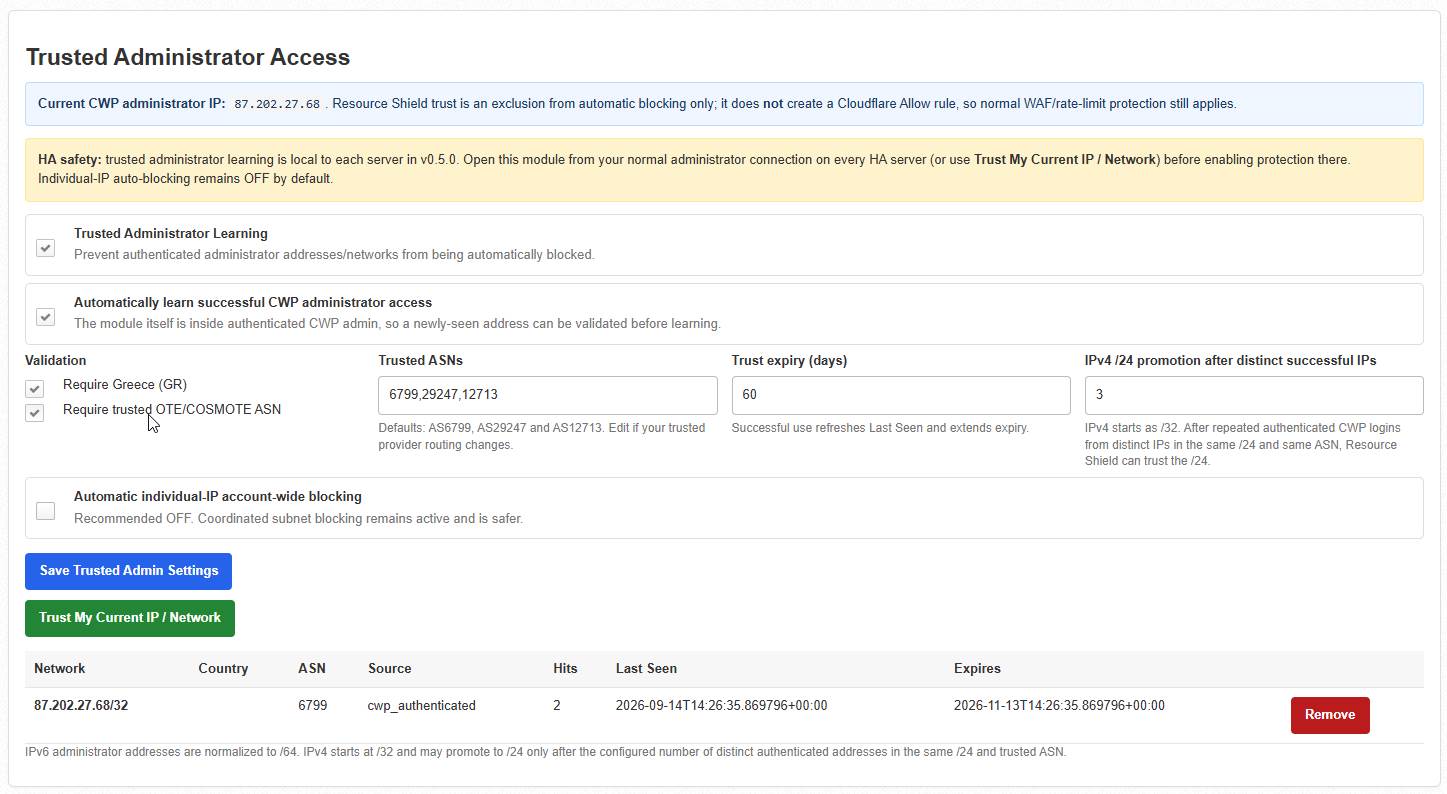
Trusted Administrator Protection
Automatic blocking is useful only when legitimate administrators are protected from accidental automated decisions.
Resource Shield therefore supports Trusted Administrator Access.
Trusted administrator connections can be excluded from the module’s automated attack-blocking logic.
IPv6 environments are also supported by allowing trusted administrator network handling rather than depending exclusively on one temporary IPv6 address.
Designed to Fight PHP-FPM Resource Exhaustion
High bandwidth is not always what brings down a WordPress alojamiento servidor.
The expensive part is often what happens after a malicious request reaches PHP.
Repeated abusive requests may trigger:
- PHP-FPM workers
- WordPress execution
- WooCommerce database queries
- WP-Cron processes
- Action Scheduler jobs
- plugin execution
- additional RAM consumption
- additional CPU consumption
Eventually a PHP-FPM pool can reach its worker limits, while legitimate visitors begin waiting for available resources.
502 Bad Gateway
503 Service Unavailable
504 Gateway Timeout
Resource Shield is designed to reduce repeated malicious traffic reaching these expensive layers once threatening behaviour has been identified.
Resource Shield + Cgroups: Two Different Jobs, One Stronger Servidor
CWP7 Resource Shield does not replace Cgroups.
Cloudflare + CWP7 Resource Shield
Detect and reduce malicious traffic reaching the
servidor
↓
CWP7 Cgroups
Control CPU, RAM and Disk I/O consumption per
alojamiento cuenta
Resource Shield concentrates on abusive traffic.
Cgroups help prevent an individual alojamiento account from consuming unlimited resources even when the traffic itself is legitimate or an application becomes unstable.
Used together, they provide a much more complete resource-protection strategy.
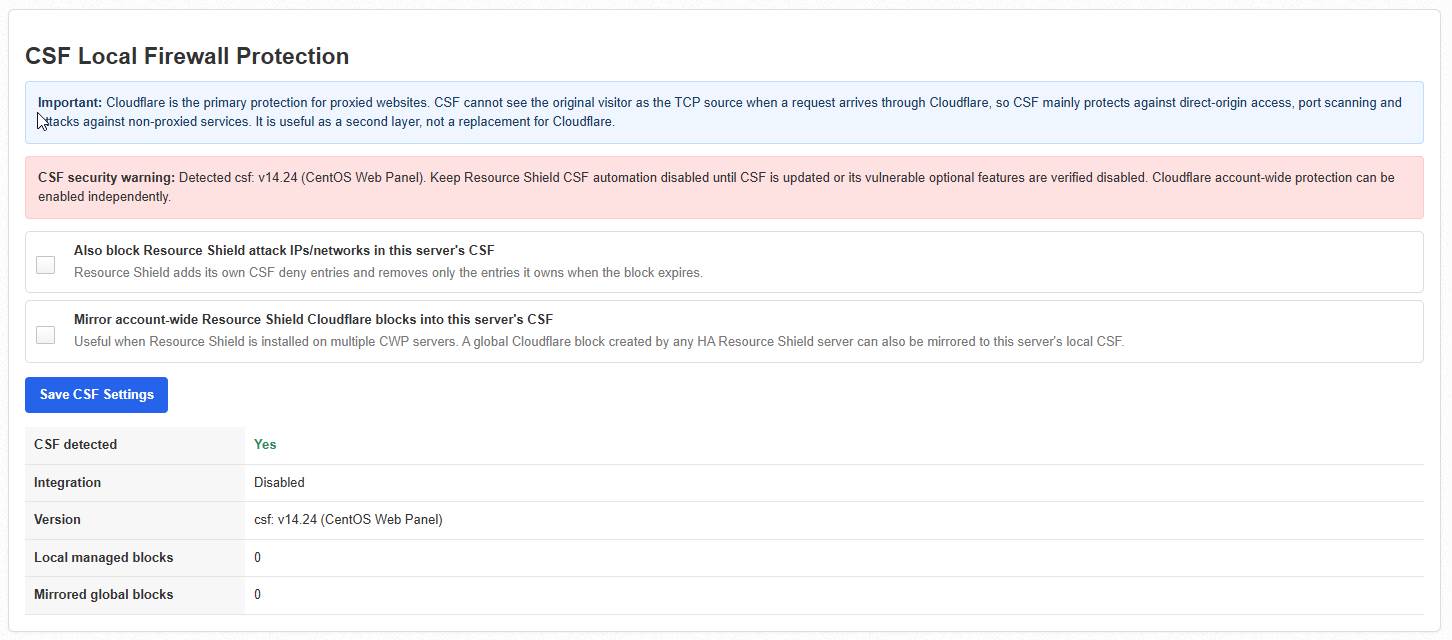
Optional CSF Integration
Cloudflare primarily protects traffic passing through the Cloudflare network.
Resource Shield can also work alongside compatible CSF installations for additional local firewall protection.
CSF may be useful for threats involving:
- direct origin traffic
- SSH attacks
- SMTP attacks
- port scanning
- non-proxied services
- websites not routed through the Cloudflare proxy
Cloudflare and CSF protect different parts of the infrastructure and can therefore complement each other.
Start Safely With Monitor Mode
Monitor Mode
Analyse activity and record detections without automatically creating new Cloudflare protection rules. Ideal for reviewing normal servidor behaviour after installation.
Protection Mode
After configuration and validation, enable Protection Mode so confirmed threats can trigger the configured Cloudflare protection automatically.
A WordPress Plugin Sees a Website.
Resource Shield Sees the Servidor.
Website security plugins remain valuable, but they operate primarily within their individual applications.
Resource Shield works from a different perspective. It is designed to observe activity affecting the alojamiento servidor, correlate suspicious traffic and help prevent confirmed malicious sources from repeatedly consuming shared infrastructure.
That difference matters when dozens of websites depend on the same CPU, RAM, PHP-FPM pools and database servidor.
A Practical Layered Defense for CWP7
Internet
↓
Cloudflare
↓
CWP7 RESOURCE SHIELD
Attack Detection + Automated Protection
↓
Nginx / Apache
↓
PHP-FPM
↓
CWP7 Cgroups
Per-Account Resource Limits
↓
WordPress / WooCommerce / PHP Applications
↓
MySQL
Who Is CWP7 Resource Shield For?
- WooCommerce alojamiento environments
- VPS administrators
- multi-servidor infrastructures
- Cloudflare users
- servers experiencing PHP-FPM saturation
- administrators wanting centralised attack visibility
If You Have Ever Seen This…
- A customer’s WordPress site gets attacked and the whole VPS slows down.
- PHP-FPM suddenly reaches its worker limits.
- CPU usage jumps without a legitimate traffic increase.
- Hundreds of requests hit
wp-login.php o xmlrpc.php.
- WooCommerce becomes slow because another hosted account is under attack.
- You manually block one IP only to see the attack continue from another.
- You manage dozens of websites and cannot investigate every WordPress installation individually.
That is exactly the type of alojamiento environment Resource Shield was created to address.
Simple Servidor Licensing
Licensing is handled through the Freespirits licensing system.
During activation, the license becomes associated with the servidor installation and cannot simply be copied to an unrelated VPS.
For legitimate servidor migrations, the activation can be reviewed and reset according to the applicable licensing terms.
Cloudflare Requirements
For automated Cloudflare protection you will need:
- A Cloudflare account
- Protected domains configured in Cloudflare
- A dedicated Cloudflare API Token
- The required account firewall permissions
Security Recommendation:
Create a dedicated Cloudflare API token specifically for Resource Shield. Do not use your Cloudflare Global API Key.
For multi-servidor deployments, use a separate restricted token for each servidor whenever possible.
Cloudflare Setup
Create a dedicated API token from:
Cloudflare Dashboard → My Profile → API Tokens → Create Token → Custom Token
Provide the required Account Firewall Access Rules: Edit permission for the Cloudflare account you want Resource Shield to protect.
For additional security, restrict the token under Client IP Address Filtering to the public IP address of the corresponding CWP7 servidor whenever appropriate.
Your Cloudflare Account ID can be copied from the Cloudflare Dashboard and entered into the Resource Shield configuration.
Straightforward Installation
After obtaining the Resource Shield package, upload it to your CWP7 servidor and connect through SSH as root.
cd /root
unzip freespirits-resource-shield-*.zip
cd freespirits-resource-shield-*/
chmod +x install.sh
./install.sh
After installation, verify the service:
systemctl status freespirits-resource-shield –no-pager -l
Then check Resource Shield itself:
resource-shield-ctl status
Abra el CWP7 administrator interface and navigate to:
Developer Menu →
CWP7 Resource Shield
Activate your license and configure your Cloudflare Account ID and dedicated API token.
Useful Administration Commands
Overall status
resource-shield-ctl status
License status
resource-shield-ctl license-status
Validate license
resource-shield-ctl license-validate
View active blocks
resource-shield-ctl blocks
Trusted administrator networks
resource-shield-ctl trusted
HA information
resource-shield-ctl ha-info
Recent activity
journalctl -u freespirits-resource-shield -n 100 –no-pager
Part of a Layered Security Strategy
Resource Shield is an additional security and resource-protection layer. It is not intended to replace:
- strong passwords and secure administrator access
- WordPress and plugin updates
- operating-system updates
- regular backups
- malware scanning
- Cloudflare configuration
- CSF
- Cgroups
- PHP-FPM tuning
- professional servidor administration
Instead, Resource Shield complements these systems by focusing on a specific and extremely important problem:
Detect abusive web traffic and prevent confirmed attack sources from repeatedly consuming valuable
servidor resources.
Protect the Servidor, Not Just One Website
If you operate a CWP7 servidor, every hosted customer ultimately depends on the health of the same underlying infrastructure.
A single attacked website should not be allowed to consume enough PHP, CPU, RAM or database capacity to affect every other customer.
CWP7 Resource Shield adds the servidor-level visibility and automated protection needed to identify coordinated abusive traffic and push confirmed threats outward toward Cloudflare.
CWP7 Resource Shield
Servidor-Level Attack Detection & Cloudflare Protection for Control Web Panel
Developed by Servicios web Freespirits
Changelog
Freespirits Resource Shield — Complete Changelog
Latest Release: v0.7.17
Release Date: October 2026
Plataforma: CWP7 / AlmaLinux / Linux VPS & Dedicated Servers
What’s New in v0.7.17?
Smarter Protection. Safer Recovery. Less Resource Consumption.
Freespirits Resource Shield has undergone a major series of improvements focused on one mission: protecting alojamiento servidor resources, preventing performance bottlenecks, reducing website downtime, and providing safe, intelligent recovery mechanisms.
The latest release introduces guided CSF firewall activation, stronger administrator protection, improved PHP-FPM failure detection, more reliable automatic updates, and the complete removal of resource-intensive Joomla/WordPress security scanning.
The result is a more focused, lightweight and reliable resource-protection module for CWP7 alojamiento environments.
v0.7.17 — CSF Guided Activation & Verified Firewall Integration
NEW: CSF Ready & Tested Activation Workflow
The CSF Local Firewall Protection interface has been redesigned to make firewall activation safer and easier to understand.
Instead of enabling firewall blocking immediately, administrators now follow a guided verification process.
New activation workflow:
- Compatibility Verification: Check the installed CSF version, CSF/LFD services, firewall configuration and relevant compatibility requirements.
- CSF Self-Test: Execute a controlled, isolated firewall test using a reserved documentation IP address.
- Ready & Tested: Display a clear confirmation that the integration has passed its operational tests.
- Protection Activation: Unlock local CSF blocking and optional Cloudflare HA block mirroring.
NEW: Isolated CSF Self-Test
The self-test performs an actual firewall verification instead of relying exclusively on version detection.
It:
- Verifies operational CSF and LFD readiness.
- Uses the reserved test address
192.0.2.123, rather than selecting a real visitor.
- Creates a temporary firewall deny rule.
- Confirms that CSF applied the rule.
- Removes the temporary rule.
- Verifies that removal succeeded.
- Records the result for future reference.
The test runs through a restricted systemd service and is initiated manually.
NEW: Clear Integration Status
The CWP interface now distinguishes between:
- TEST REQUIRED: CSF has not yet completed the activation test.
- RUNNING: The isolated self-test is executing.
- READY & TESTED: The integration has passed verification.
- ACTIVE — VERIFICATION REQUIRED: Protection was enabled before upgrading and requires the new verification procedure.
After a successful test, the test button is hidden and the protection configuration becomes available.
Improved Activation Security
- New CSF blocking activation is rejected until verification succeeds.
- New Cloudflare-to-CSF mirroring activation requires successful verification.
- GUI and CLI operations enforce the activation requirement.
- Root-level readiness is checked again before allowing activation.
- Test records are tied to the CSF executable and reported version.
- Changing the detected CSF binary or version invalidates the previous verification.
- Emergency disabling remains available even when verification is not complete.
Existing enabled protection is preserved during upgrades to avoid unexpected service interruption.
Result: Administrators gain a clear and testable firewall activation process, with fewer opportunities for accidental or unsafe configuration.
v0.7.16 — Automatic Update Reliability & Fleet Deployment Fixes
This release resolves installation and rollback issues discovered during real CWP7 servidor upgrades.
Fixed: Incorrect Systemd Timer Detection
Some CWP/AlmaLinux installations returned unexpected states when checking retired systemd services.
The installer could incorrectly interpret a missing or static compatibility timer as an active service, causing installation failure.
Improvements:
- Correct recognition of missing systemd units.
- Correct handling of static compatibility timers.
- Explicit verification of service load and runtime states.
- Rejection of genuinely enabled or running retired scanners.
- Consistent checks in both installer and updater.
- Safer retirement of legacy services across different CWP installations.
Improved Post-Installation Verification
Added stronger checks to distinguish files copied successfully from a fully operational installation.
Verification includes:
- Installed CLI version.
- Running Resource Shield engine.
- CWP administrative interface.
- Systemd service health.
- Retired CMS scanning components.
- PHP and configuration validation.
Added a read-only fleet verification script to assist administrators when upgrading multiple servers.
Result: More dependable upgrades and clearer diagnostics across multi-servidor environments.
v0.7.15 — Legacy Updater Compatibility Hotfix
Corrected a compatibility issue affecting upgrades from older Resource Shield versions.
Improvements
- Fixed incorrect classification of inactive static systemd timers.
- Updated installer preflight and updater post-installation checks.
- Preserved the inactive legacy compatibility bridge needed by older updater versions.
- Ensured actual CMS scanning services remain disabled.
- Added additional regression tests for safe unit-state handling.
- Preserved automatic rollback protection.
Result: Improved compatibility between older installed versions and the redesigned Resource Shield architecture.
v0.7.14 — Multi-Servidor Automatic Update Bridge
Introduced a transitional update mechanism for older Resource Shield installations.
NEW: Fleet-Compatible Upgrade Process
Older updater versions expected Joomla/WordPress scanner components to remain installed.
Removing those components created a compatibility conflict.
The new transition mechanism:
- Supplies temporary, non-scanning compatibility markers.
- Allows older update verification processes to recognize the upgrade.
- Keeps retired security scanners inactive.
- Schedules cleanup after successful installation.
- Protects restored files if rollback occurs.
- Preserves the existing signed-update security process.
Result: A path toward centralized updates without manually reinstalling Resource Shield on every alojamiento servidor.
v0.7.13 — Major Resource Protection & Availability Update
REMOVED: Joomla + WordPress — Exploit & File Injection Monitor
Resource Shield no longer includes the resource-intensive Joomla/WordPress exploitation and filesystem scanning subsystem.
Following a review of production servidor performance and PHP-FPM bottlenecks, this functionality was removed from Resource Shield.
Removed components:
- Joomla/WordPress CMS discovery scans.
- PHP injection and executable-file directory scans.
- Recurring security scan timers.
- Dedicated Web Defense scanning workers.
- Web Defense scan email workers.
- Scanner-related GUI controls.
- Scanner command interfaces.
Historical incident evidence is preserved. Existing separately configured ModSecurity rules are not automatically removed.
Important architectural change: Deep Joomla/WordPress malware, exploit and filesystem security inspections belong to the separate Freespirits Security Audit Module.
Resource Shield now concentrates on continuous lightweight resource monitoring and availability protection.
NEW: PHP-FPM Socket Failure Detection
Added passive recognition of FastCGI socket failures associated with PHP-FPM worker and connection saturation.
Detectable conditions include:
- Repeated PHP-FPM socket connection failures.
Resource temporarily unavailable socket errors.- FastCGI connection saturation.
- Persistent backend response failures.
- Associated website availability incidents.
The module uses bounded log inspection rather than launching expensive website crawls.
When relevant evidence is found, Resource Shield can escalate the affected account’s health status and issue incident notifications.
Improved Recovery Safety
- Preserves conservative PHP-FPM self-healing safeguards.
- Avoids automatically restarting shared PHP-FPM master processes.
- Maintains recovery cooldown and hourly limits.
- Retains incident history and diagnostic evidence.
- Avoids synthetic website requests during routine recovery decisions.
NEW: CSF Operational Self-Test
Introduced an isolated manual CSF test capable of creating, verifying and removing a temporary firewall deny rule.
Improved Administrator Firewall Protection
Additional checks protect:
- Trusted administrator IPs and networks.
- Configured CSF allowlists.
- Temporary CSF ALLOW entries.
- Local servidor addresses.
- Active administrator connections.
- SSH connections on nonstandard ports.
Result: A cleaner separation between servidor resource protection and deep security auditing, together with better detection of the PHP-FPM failures that can contribute to 502/503/504 errors.
v0.7.12 — Resource Consumption & Scan Frequency Controls
This transitional release introduced controls to reduce the workload of the former Web Defense scanner.
Improvements
- Changed the recurring scan interval from approximately three minutes to 120 minutes.
- Added configurable scanning intervals up to 1,440 minutes.
- Introduced CPU and memory limits for the scanner worker.
- Added low-priority disk I/O scheduling.
- Added scan timeouts and bounded filesystem/log processing.
- Prevented overlapping scans.
- Consolidated routine security notifications.
- Added configurable email cooldowns.
- Separated email retries from expensive filesystem scans.
Note: The CMS scanner was subsequently retired completely in v0.7.13. These historical controls are no longer part of the current Resource Shield scanning interface.
v0.7.11 — CSF Stability & Service Isolation Fixes
Fixed: CSF Read-Only Filesystem Errors
Corrected systemd filesystem restrictions that prevented Resource Shield from writing to the required CSF configuration directory.
The main service now permits the necessary /etc/csf write operations without making the entire /etc filesystem writable.
Additional Improvements
- Fixed the former Web Defense Python module import error.
- Added bounded retry delays after CSF command failures.
- Reduced repeated firewall error logging.
- Improved installation preflight validation.
- Preserved licensing, Cloudflare HA, administrator settings and existing protection policies.
Result: Improved firewall integration reliability and fewer repeated errors during CSF write failures.
v0.7.10 — Licensed Automatic Update Reliability
Significantly improved the signed automatic-update mechanism.
Improvements
- Added detailed update progress and installation phases.
- Distinguished queued update requests from completed installations.
- Added a read-only updater diagnostics command.
- Prevented accidental installation of older versions.
- Improved compatibility with manually installed newer releases.
- Preserved administrator-selected notification-only update policies.
- Added durable per-recipient update email retry queues.
- Added an independent email retry timer.
- Preserved detailed installation and rollback results.
Result: More transparent, controlled and reliable managed software updates.
v0.7.9 — Administrator & Visitor Protection Improvements
Improved Firewall Safety
Introduced stronger protections to prevent legitimate administrators and visitors from being accidentally blocked.
Improvements
- Shared administrator trust information across protection components.
- Checked active administrator sessions before applying temporary bans.
- Respected static and temporary CSF ALLOW entries.
- Protected local servidor addresses.
- Added fail-closed behavior when required safety information was unavailable.
- Improved visitor IP verification behind reverse proxies and Cloudflare.
- Added clearer protection-readiness reporting.
- Required stronger evidence before optional high-confidence WAF-related blocking.
The Web Defense-specific features introduced here were subsequently retired in v0.7.13.
v0.7.8 — Legacy CWP CSF Compatibility
Improved compatibility with older CSF versions commonly found in CWP7 environments.
Improvements
- Replaced arbitrary minimum-version rejection with operational capability checks.
- Added support for reviewed legacy CWP CSF builds, including v14.24.
- Verified CSF executable availability and read-only firewall operations.
- Checked CSF and LFD services.
- Checked legacy Messenger configuration safety.
- Added explicit legacy-version risk acknowledgment.
- Improved CSF compatibility warnings and GUI diagnostics.
Important: Passing compatibility tests verifies functionality, not the security patch status of an older CSF release.
v0.7.7 — Web Attack Defense Introduction
Introduced the original Joomla/WordPress Web Attack Defense subsystem, including CMS monitoring, suspected file-injection reporting, ModSecurity event correlation and security notifications.
Also improved updater failure reporting and durable mail delivery handling.
Historical note: The Web Attack Defense scanning subsystem was later removed in v0.7.13 to reduce its impact on alojamiento resources and separate deep security inspection from Resource Shield’s core responsibilities.
v0.7.6 — Safer SQLite Update Rollbacks
- Fixed update snapshot compatibility with Python 3.6.
- Added a fallback transactional SQLite backup method.
- Added database integrity verification before updates.
- Improved rollback snapshot reliability.
- Preserved signed package validation and configuration backups.
v0.7.5 — Improved CWP Administration Interface
- Introduced organized administration tabs.
- Improved dashboard navigation and layout.
- Added clearer status indicators.
- Kept essential health and protection metrics visible.
- Added Cloudflare setup and configuration guidance.
- Improved documentation for restricted Cloudflare API tokens.
v0.7.4 — Secure GUI Update Installation
- Introduced a restricted CWP-to-root update bridge.
- Added a dedicated systemd update-installation worker.
- Improved update button reliability under non-root CWP service accounts.
- Added installation progress and failure diagnostics.
- Restricted privileged actions to approved commands.
- Improved installer and uninstall validation.
v0.7.3 — License Manager Update Entitlements
- Added Freespirits License Manager v0.4.1 update-entitlement compatibility.
- Added support for Unlimited, Fixed Period and Internal Servidor update access.
- Displayed update entitlement in the GUI and CLI.
- Separated software-license validity from managed-update eligibility.
- Preserved signed package verification and rollback safety.
v0.7.2 — Persistent PHP-FPM Incident Tracking
- Corrected duplicate incident creation during continuous PHP-FPM saturation.
- Added persistent incident state across service restarts.
- Introduced unique incident correlation identifiers.
- Linked saturation, recovery attempts and escalation records.
- Improved administrator notification delivery.
- Reduced repeated alert emails.
- Improved retry handling for failed notifications.
v0.7.1 — Signed Automatic Updates
Introduced managed updates through Freespirits License Manager.
Security Features
- License and servidor-binding verification.
- Ed25519 signed release manifests.
- Short-lived private package downloads.
- SHA256 and package-size verification.
- ZIP package validation.
- Local rollback snapshots.
- Post-installation health checks.
- Automatic rollback on supported failures.
- Stable and Beta release channels.
- Configurable maintenance windows.
- Administrator update notifications.
v0.7.0 — PHP-FPM Incident Monitor & Emergency 504 Recovery
A major release introducing persistent PHP-FPM incident management and guarded emergency recovery.
Main Capabilities
- Monitoring of persistent PHP-FPM pool saturation.
- Detection of repeated 502/503/504 gateway errors through passive log evidence.
- Identification of verified slow PHP-FPM workers.
- Bounded recovery of individual affected PHP-FPM child processes.
- Cooldown periods and maximum recovery attempts.
- Persistent incident history.
- Administrator email notifications.
- Detection of recurring bottlenecks.
- Identification of likely workload patterns from bounded slowlog evidence.
The recovery engine never automatically changes pm.max_children or forcibly restarts an entire shared PHP-FPM master.
Earlier Resource Protection Improvements — v0.6.4 to v0.6.9
v0.6.9 — Recovery Persistence
Improved sustained PHP-FPM saturation tracking, retained verified slow-worker evidence across monitoring windows, and introduced safe follow-up recovery decisions.
v0.6.8 — License Monitoring & Forensics
Added license state-change alerts, notification recipients, persistent license-event history, grace-period handling and safer email retries.
v0.6.7 — Intelligent PHP-FPM Self-Healing
Introduced precise per-account PHP-FPM pool detection, slowlog analysis, guarded child-worker recovery and dynamic request-cost scoring.
v0.6.6 — Account Resource Health
Added Cgroup CPU/memory telemetry, PHP-FPM worker capacity checks, account bottleneck detection and detailed resource-health reporting.
v0.6.5 — Intelligent Protection Policies
Introduced Conservative, Balanced, Aggressive and Custom profiles, enhanced sensitive-request detection, dynamic-request flood protection and resource-pressure-aware decisions.
v0.6.4 — Licensing & Cloudflare Improvements
Improved license activation and dual-stack servidor compatibility while retaining Cloudflare account-wide protection, HA integration and existing firewall safeguards.
Current Resource Shield Capabilities
With the v0.7.17 release, Resource Shield is focused on six essential protection areas:
1. Servidor Resource Protection
Monitor resource pressure, dynamic request floods and alojamiento-account bottlenecks without launching recurring CMS filesystem scans.
2. PHP-FPM Health & Recovery
Monitor PHP-FPM pools, worker saturation, slow requests, socket connection failures and gateway errors, using conservative recovery safeguards.
3. CSF Local Firewall Protection
Safely integrate local firewall blocking with compatibility checks, administrator exclusions and a real operational self-test before new activation.
4. Cloudflare & High Availability
Provide account-wide Cloudflare protection and HA Active-Active cooperation across participating CWP7 servers, with optional verified CSF block mirroring.
5. Licensing & Automatic Updates
Support commercial licensing, signed software releases, update entitlement checks, installation verification, rollback protection and administrator notifications.
6. Incident Reporting & Diagnostics
Maintain resource-health information, PHP-FPM incident history, recovery records, firewall status, licensing diagnostics and update history.
Important Compatibility & Safety Notes
- Existing configuration, licensing and protection settings are preserved during supported upgrades.
- Existing CSF integrations remain enabled during upgrades; new activation follows the guided self-test requirements.
- Legacy CSF compatibility does not guarantee that an outdated firewall build includes current security patches.
- PHP-FPM self-healing is guarded and cannot guarantee prevention or recovery of every possible 502/503/504 failure.
- Shared PHP-FPM master processes are not automatically restarted as a general recovery action.
- Joomla/WordPress deep security and filesystem scans are no longer included in Resource Shield.
- Historical security evidence and previously installed ModSecurity rules are not automatically deleted during scanner retirement.
- Automatic updates require valid licensing, publisher authorization and a correctly signed release.
- Fleet-wide upgrades should be validated on a canary servidor before deployment to all production systems.
Our Development Philosophy
Resource Shield should consume minimal resources while protecting the maximum amount of servidor availability.
The latest releases reflect that principle by separating resource protection from heavy security inspection, improving passive diagnostics, enforcing safe firewall activation and strengthening guarded PHP-FPM recovery.
The objective is straightforward:
Detect bottlenecks early. Protect legitimate visitors. Recover safely when possible. Notify administrators when intervention is needed. Keep alojamiento services available.
Freespirits Resource Shield v0.7.17 — Built for smarter resource protection on CWP7.