24/7 Customer Support
Online store always open
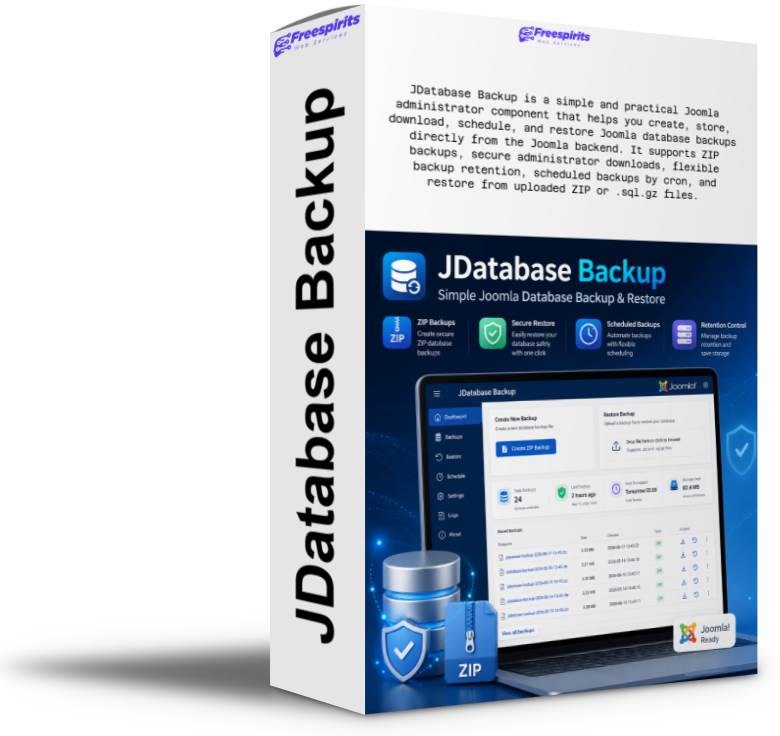
JDatabase Backup is a simple and practical Joomla administrator component that helps you create, store, download, schedule, and restore Joomla database backups directly from the Joomla backend. It supports ZIP backups, secure administrator downloads, flexible backup retention, scheduled backups by cron, and restore from uploaded ZIP or .sql.gz files. Ideal for Joomla 3.10.11 websites, VirtueMart shops, freelancers, hosting providers, and website administrators who want an easier and safer way to protect their Joomla database without relying on phpMyAdmin.

JDatabase Backup is a practical Joomla administrator component created to make database backup and restore tasks easier, faster, and more accessible for Joomla website owners, web designers, hosting providers, freelancers, and site administrators who want a simple way to protect their Joomla database without depending on phpMyAdmin, complicated server tools, or manual database export procedures.
Every Joomla website depends on its database. Articles, categories, menus, users, extensions, VirtueMart products, orders, settings, custom fields, contact forms, templates, modules, plugin configuration, and many other important parts of the website are stored inside the database. If the database is lost, damaged, overwritten, hacked, or corrupted during an update, the website can stop working immediately. That is why keeping reliable database backups is one of the most important maintenance tasks for every Joomla administrator.
The problem is that many Joomla users do not feel comfortable using phpMyAdmin or server-level tools. Exporting a database manually can be confusing. Some servers have old phpMyAdmin versions. Some exports fail because of browser timeout, PHP notices, missing export options, large tables, permission limits, or broken downloads. Restoring can be even more stressful, especially when the database contains views, definers, routines, or statements that require special MySQL privileges.
JDatabase Backup was created to solve this problem with a simple, focused, Joomla-friendly tool that works directly from the Joomla administrator area.
It is not overloaded with unnecessary features. It does one important job: it helps you create database backups and restore them when needed.
JDatabase Backup adds an easy database backup and restore interface inside the Joomla administrator panel. Instead of logging into phpMyAdmin, searching for the correct database, choosing export settings, selecting compression options, and hoping that the download will complete successfully, the administrator can create a database backup directly from the component.
The component is designed with a simple workflow:
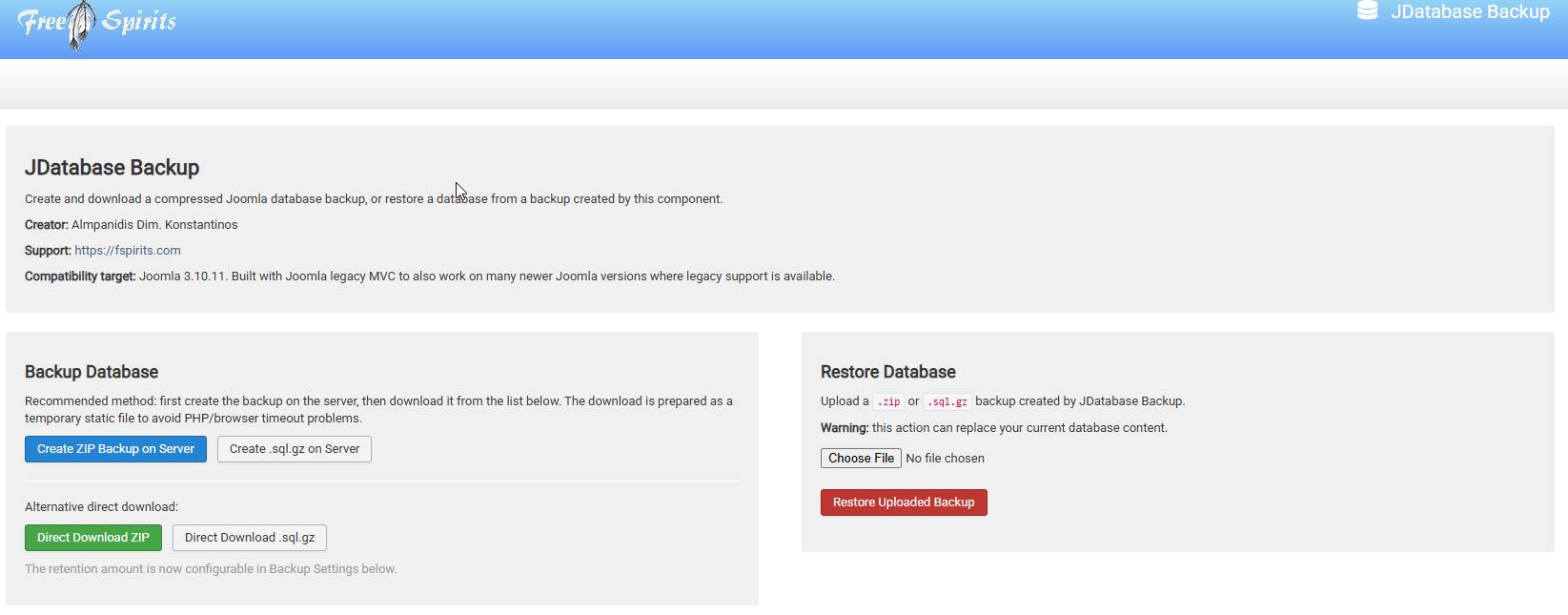
Create the backup on the server, store it safely, and then download it from the list of stored backups.
This workflow is especially useful because direct browser downloads can sometimes fail when the database is being exported at the same time. Some browsers may interrupt a long-running download. Some servers may close the connection. Some PHP environments may timeout during the export process. JDatabase Backup avoids this problem by first creating the backup file on the server and then allowing the administrator to download the completed file afterwards.
This makes the process much more reliable compared to trying to generate and download the database backup in one single browser request.
JDatabase Backup supports ZIP database backups, making it easier for users to download and store their database backup files locally.
The ZIP format is familiar to most users and is usually handled well by browsers, operating systems, hosting panels, and security tools. Inside the ZIP file, the component stores the SQL database dump. This means the backup remains compressed, portable, and easy to save on your computer, external drive, cloud storage, or client archive folder.
The component can also support .sql.gz backups, but ZIP is the recommended format for most users because it is more familiar and convenient.
A typical backup file generated by the component may look like this:
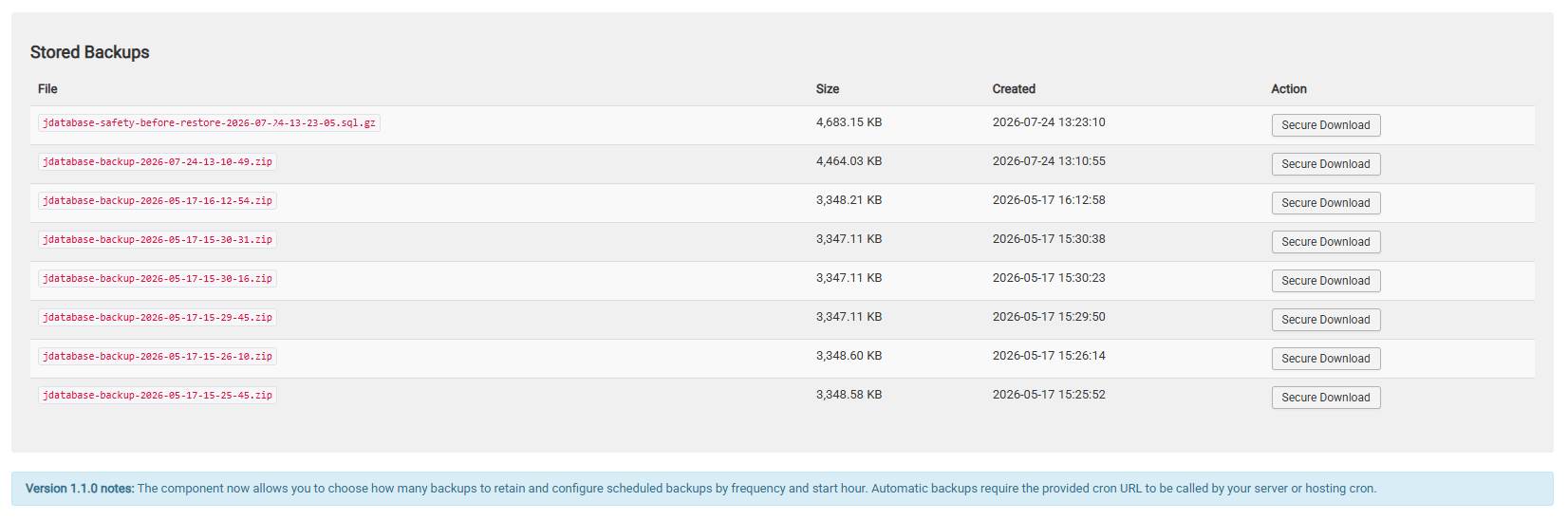
jdatabase-backup-2026-07-24-13-10-49.zip
This type of filename helps the administrator quickly identify when the backup was created.
Creating a backup is only half of the protection. A backup is useful only if it can also be restored when needed.
JDatabase Backup includes a restore function that allows the administrator to upload a supported backup file and restore the database from it. This can be helpful after a failed extension update, a broken migration, a hacking incident, a database corruption issue, or a mistake made during website changes.
The restore function is designed to work with backups created by JDatabase Backup. The administrator can upload the ZIP backup file, and the component will extract the SQL dump and attempt to import it back into the Joomla database.
Before restoring, it is always important to understand that database restore is a powerful action. Restoring a database can replace current data with the data from the backup file. That means new articles, new users, new orders, new settings, or any changes made after the backup date may be lost if the older backup is restored. For this reason, database restore should always be used carefully and ideally first tested on a staging copy of the website.
One of the most useful safety features of JDatabase Backup is the creation of a safety backup before restore.
Before importing the uploaded backup file, the component can create a backup of the current database state. This provides an extra level of protection in case the restore does not produce the expected result.
This is especially important when working with live Joomla websites, VirtueMart shops, client projects, or websites that are frequently updated.
For example, if you restore an older database backup and then realize that the wrong file was uploaded, the safety backup may help you recover the state that existed immediately before the restore attempt.
This feature is very important because restore operations always carry risk. JDatabase Backup reduces that risk by trying to preserve the current state before making major changes.
JDatabase Backup includes flexible backup retention settings, allowing the administrator to choose how many database backups should be retained on the server.
Instead of keeping unlimited backups and slowly filling the hosting account with old files, the administrator can define the number of backups that should be kept.
For example, you may choose to keep:
7 backups for a simple small website
14 backups for a regularly updated business website
30 backups for a more active Joomla website
60 or more backups for a website where frequent database changes are important
This makes the component useful for different types of Joomla installations. A small company website may only need a few recent backups. A VirtueMart shop, membership website, or active content portal may need a larger backup history.
Older backups are automatically removed according to the retention setting, helping you save disk space and keep the backup folder organized.
Manual backups are useful, but automatic scheduled backups are even better.
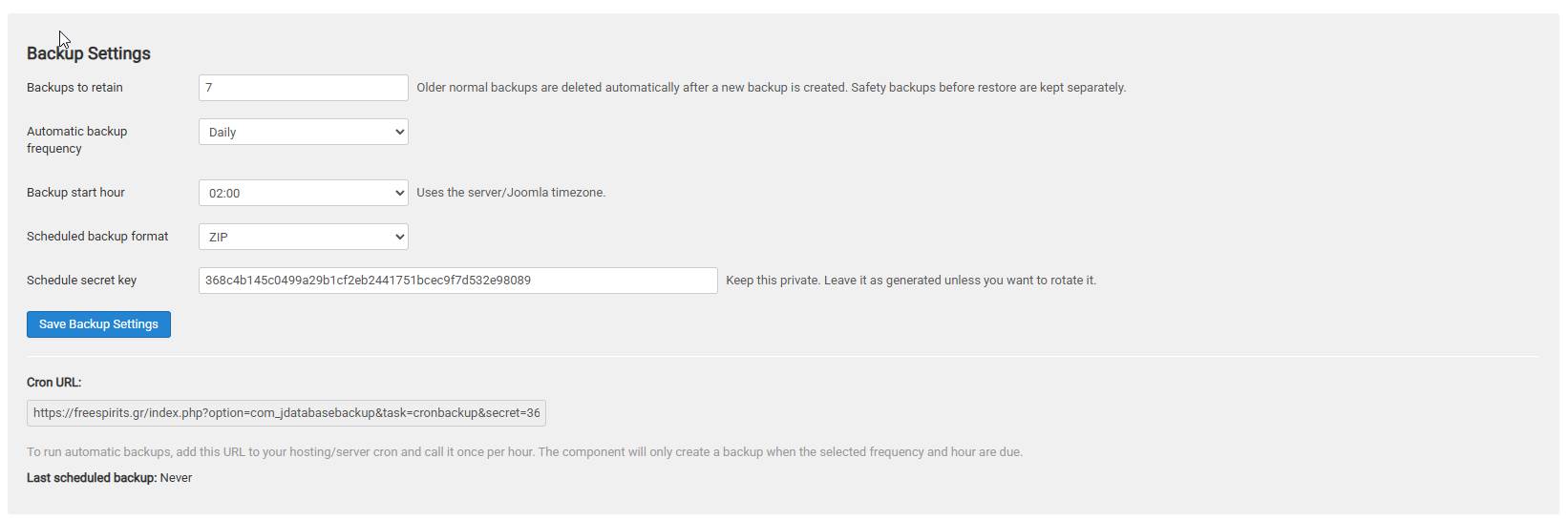
JDatabase Backup includes settings that allow the administrator to configure scheduled backup behavior. The user can choose how often the backup should run and at what hour of the day the backup should start.
Available schedule options can include:
Disabled
Daily
Weekly
Monthly
The administrator can also select the preferred backup hour. This is useful because backups should usually run during a quiet time of the day, when the website has less traffic and fewer database changes.
For example, a website owner may choose to create backups every day at 03:00 in the morning. Another administrator may prefer weekly backups every Sunday night. A less frequently updated website may only need a monthly database backup.
Because Joomla 3 does not run background scheduled tasks by itself, JDatabase Backup provides a secure Cron URL. This URL can be added to the server’s cron system and called once per hour. The component then checks its own settings and creates a backup only when the configured frequency and hour are due.
This approach makes the tool practical for real hosting environments, including CWP, cPanel, Plesk, or custom Linux servers.
Automatic backup URLs must be protected. A public cron URL without protection could be abused if someone discovers it.
JDatabase Backup includes a private schedule secret key. The cron URL includes this secret key so that scheduled backup requests can be verified before the backup process is executed.
This helps prevent unauthorized access to the backup creation process.
The administrator can copy the generated Cron URL from the component settings and add it to the hosting control panel cron job system. The server can call it regularly, but the component will only perform a backup when the schedule conditions are met.
JDatabase Backup is designed as a Joomla administrator component. This means the tool is accessed from inside the Joomla backend, just like other Joomla components.
The administrator can manage database backups without leaving Joomla.
This is useful for website owners and support providers who prefer to keep website maintenance tasks inside the Joomla admin area instead of moving between different tools and server panels.
The component interface includes sections for creating backups, restoring backups, viewing stored backups, downloading stored backup files, and configuring backup settings.
Database backup and restore tools should never be available to normal users. JDatabase Backup is intended for authorized administrators only.
The component includes administrator-level access protection so that only users with the correct permissions should be able to access and use its functions.
This is important because a database backup may contain sensitive information, including user accounts, email addresses, order data, site configuration, extension settings, and other private website information.
Restore access is even more critical because restoring a database can overwrite the website’s current content.
JDatabase Backup is designed with the assumption that backup and restore operations should be handled only by trusted Joomla Super Users or trusted administrators.
JDatabase Backup uses Joomla token protection for important admin actions. This helps protect backup and restore operations from unauthorized form submissions and cross-site request forgery attempts.
Security token protection is an important part of Joomla administrator tools because it verifies that the request came from a valid administrator session and not from an external or malicious request.
This is especially important for actions like creating a database backup, restoring a backup, and downloading protected files.
During development and testing, download reliability became one of the most important improvements.
Some servers and browsers may block or interrupt database backup downloads if the file is streamed directly from PHP. Other environments may create problems when downloading ZIP files from public media folders. HTTP/2 protocol errors, MIME issues, server restrictions, or security rules may interfere with a direct static download link.
JDatabase Backup was improved to use a secure authenticated Joomla administrator download method for stored backups. This means the backup file is downloaded through the Joomla backend instead of being exposed as a simple public file link.
This approach offers several benefits:
It avoids public access to backup files.
It reduces direct media folder download problems.
It keeps the download process connected to administrator authentication.
It improves compatibility with restrictive server environments.
It prevents unnecessary exposure of sensitive database backup files.
For a database backup tool, this is a very important feature. A database backup should not be publicly accessible from a predictable folder.
Real Joomla websites can have complex database structures. Many Joomla extensions create additional tables. Some extensions create views. Some shops and business systems may include triggers, routines, or database objects that behave differently from normal tables.
During practical testing, JDatabase Backup was improved to handle several restore problems that may appear on real hosting environments.
For example, some SQL dumps contain DEFINER clauses. These clauses can cause restore failures when the database user does not have SUPER or SET USER privileges. This is common on shared hosting and managed servers.
JDatabase Backup includes restore cleanup logic to remove or adjust privileged SQL statements that can block restoration in normal hosting accounts.
The component can also handle cases where a table or view already exists from a previous failed restore attempt. Instead of immediately stopping with an “already exists” error, the restore process includes logic to deal with existing database objects.
Another important improvement is the handling of database views. A view is not a normal table. Some views are based on joins and cannot accept inserted data. If a backup tries to insert data into a join view, MySQL can reject the operation. JDatabase Backup includes logic to skip data inserts for views and restore the view structure instead.
These improvements make JDatabase Backup more practical for real Joomla installations, not just simple test databases.
JDatabase Backup was created and tested with Joomla 3.10.11 compatibility in mind.
Many Joomla websites are still running Joomla 3, especially older business websites, custom Joomla systems, VirtueMart shops, and client websites using extensions that have not yet been migrated to Joomla 4, Joomla 5, or Joomla 6.
For these websites, a simple and reliable database backup component is extremely valuable.
JDatabase Backup uses a Joomla 3-compatible structure, making it suitable for Joomla 3.10.11 websites where legacy component architecture is expected.
For newer Joomla versions, a separate modern branch may be required in the future. However, this version is focused on Joomla 3.10.11, which remains an important version for many existing Joomla websites.
JDatabase Backup is not only useful for website owners. It is also very useful for web designers, freelancers, hosting providers, and Joomla support technicians.
Before making changes to a client website, you can quickly create a database backup. Before updating an extension, changing configuration, cleaning malware, modifying VirtueMart settings, or testing a fix, you can create a restore point.
This can save time and reduce stress.
Instead of asking the client for hosting panel access or phpMyAdmin access, you can create the database backup directly from the Joomla administrator area, provided that you have the correct admin permissions.
For hosting providers and support professionals, this kind of tool can become part of the standard Joomla maintenance workflow.
Updating Joomla or Joomla extensions can sometimes create unexpected issues. A plugin update can break a feature. A component update can change database tables. A migration can fail halfway. A template framework update can affect settings.
Before performing any major Joomla update, it is smart to create a database backup.
JDatabase Backup makes this step quick and simple.
You can create a ZIP backup, store it on the server, download it to your computer, and then continue with the update process. If something goes wrong, you have a database restore option available.
Joomla websites can sometimes be affected by malware, suspicious files, unwanted administrator users, injected content, spam pages, or database modifications.
During cleanup, administrators often need to make many changes. They may remove extensions, delete suspicious users, clean content, update configuration, or repair tables.
Before making these changes, it is useful to create a backup of the current database state. After cleanup, another backup can be created as a clean restore point.
JDatabase Backup can help website administrators keep database snapshots during the recovery process.
VirtueMart websites rely heavily on the database. Products, categories, orders, customers, payment settings, shipment settings, coupons, and shop configuration are stored in the database.
For a VirtueMart website, losing the database can be serious.
JDatabase Backup can help VirtueMart administrators create regular database backups, especially before shop updates, product imports, extension changes, or order management operations.
It is also useful for content-heavy Joomla websites, such as news portals, directories, blogs, educational websites, and business websites with many articles and categories.
JDatabase Backup is designed to stay focused.
It does not try to replace a full server backup system. It does not try to copy all website files. It does not try to manage cloud storage, email delivery, file synchronization, or advanced server snapshots.
Its purpose is simple:
Create and restore Joomla database backups from the Joomla administrator area.
This makes it lightweight, easy to understand, and suitable for administrators who want a focused database backup tool without unnecessary complexity.
Although JDatabase Backup is a useful tool, it is always best to follow a complete backup strategy.
A full website backup should include:
Database backup
Website files backup
Images and media backup
Template files
Extension files
Configuration files
Off-server storage
JDatabase Backup focuses on the database part of the backup strategy. It should be used together with regular file backups or hosting-level backups for complete website protection.
For best results, download your important backups to your computer or another safe location. Do not keep all backups only on the same server. If the server fails completely, server-only backups may not be enough.
JDatabase Backup includes:
Joomla administrator database backup interface
ZIP database backup support
.sql.gz support
Restore from uploaded ZIP backup
Restore from uploaded .sql.gz backup
Server-first backup creation
Stored backup list
Secure administrator download
Flexible backup retention
Automatic deletion of older backups according to settings
Scheduled backup support
Daily, weekly, and monthly schedule options
Selectable backup start hour
Private cron secret key
Safety backup before restore
Joomla token protection
Super User/admin-focused access
Restore cleanup for DEFINER privilege issues
Restore handling for existing tables and views
Skip insert operations for database views
Support link branding for fspirits.com
Created by Almpanidis Dim. Konstantinos
JDatabase Backup is ideal for:
Joomla website owners
Joomla 3.10.11 administrators
Freelancers managing client websites
Web designers working with Joomla
Hosting providers supporting Joomla clients
VirtueMart shop administrators
Website maintenance professionals
Developers who need quick database restore points
Users who do not want to depend on phpMyAdmin
Administrators who want simple ZIP database backups
JDatabase Backup saves time, simplifies database protection, and gives Joomla administrators a practical restore option.
Instead of struggling with phpMyAdmin export errors, browser download problems, or complicated SQL restore issues, you can manage database backups directly from Joomla.
It is especially useful when you want a quick backup before making changes, updating extensions, cleaning a website, testing configuration, or moving data between environments.
The tool was built through real testing and improved step by step to handle practical problems that appear on real Joomla hosting environments.
It is simple, but powerful where it matters.
JDatabase Backup is a Joomla administrator component that helps you create, store, download, schedule, and restore Joomla database backups in an easier and more controlled way.
It supports ZIP backup files, secure administrator downloads, flexible retention settings, scheduled backup options, restore uploads, safety backups before restore, and practical restore fixes for common database import problems.
For Joomla 3.10.11 websites, especially older business websites, VirtueMart shops, and client Joomla installations, JDatabase Backup can become a very useful maintenance tool.
It gives administrators a simple way to protect the most important part of the website: the database.
Created by Almpanidis Dim. Konstantinos with support available through https://fspirits.com, JDatabase Backup is a practical solution for Joomla users who want more control, less stress, and a faster way to create and restore database backups.
Not Sure Yet?
See Amazing Additional Features And Details

| Platform | Joomla |
|---|---|
| Compatibility | Joomla 3.10.11 and newer |
| Product Type | Administrator Component |
| Backup Format | ZIP, SQL.GZ |
| Main Function | Database Backup and Restore |
| Automation | Manual Backup, Scheduled Cron Backup |
| License | Digital Download |

29,00 € Original price was: 29,00 €.9,99 €Current price is: 9,99 €.

Welcome to Freespirits! I’m your AI Tech Specialist. I can help with our hosting services, products and technical questions. How can I assist you today?
Please introduce yourself to start a conversation.
Your chat is ready to close. Would you like us to create a support ticket for our team, using your details and conversation?



 English English English Greek German French Spanish English English English Greek
German
French
Spanish
English English English Greek German French Spanish English English English Greek
German
French
Spanish