Descripción
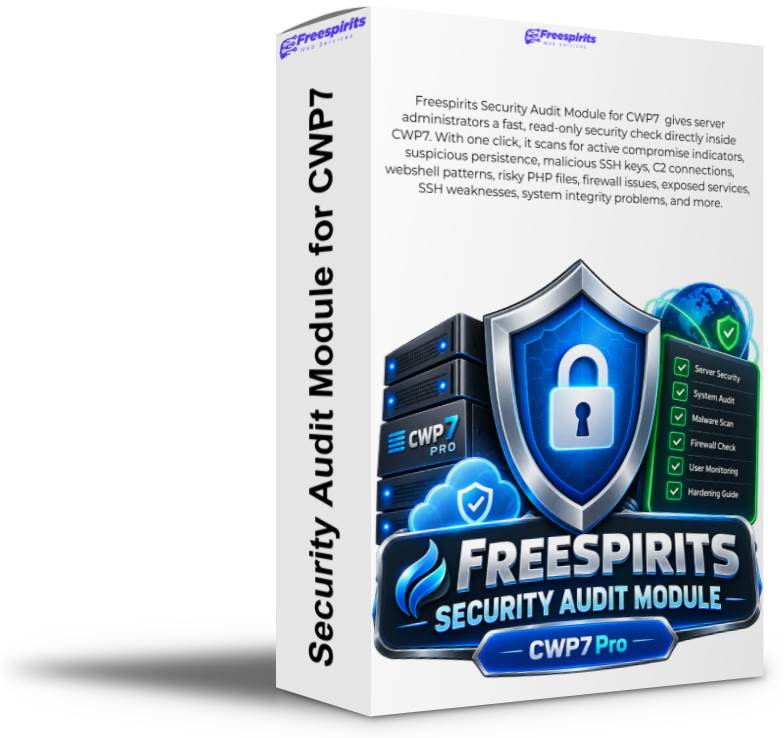
CWP7 Security Audit Module
Professional Read-Only Security Auditing for CWP7 Servers
Turn a complicated Linux security investigation into a structured, understandable security assessment directly inside your CWP7 administration panel.
✓ Read-Only by Design
✓ CWP7-Aware Detection
✓ Evidence-Based Findings
✓ Background Scanning
Why Every Serious CWP7 Administrator Needs Better Security Visibility
A alojamiento servidor may contain hundreds of processes, thousands of files, multiple PHP versions, WordPress installations, scheduled jobs, firewall rules, SSH keys, system services, database listeners and CWP-specific components.
Knowing whether everything is operating normally can require dozens of Linux commands, manual log inspection, filesystem searches, process reviews and careful interpretation of raw output.
The real challenge is not simply collecting information.
The challenge is knowing which findings actually indicate danger — and which are simply normal characteristics of a CWP7 alojamiento servidor.
CWP7 Security Audit Module brings these checks together into one structured interface so administrators can quickly understand what deserves attention.
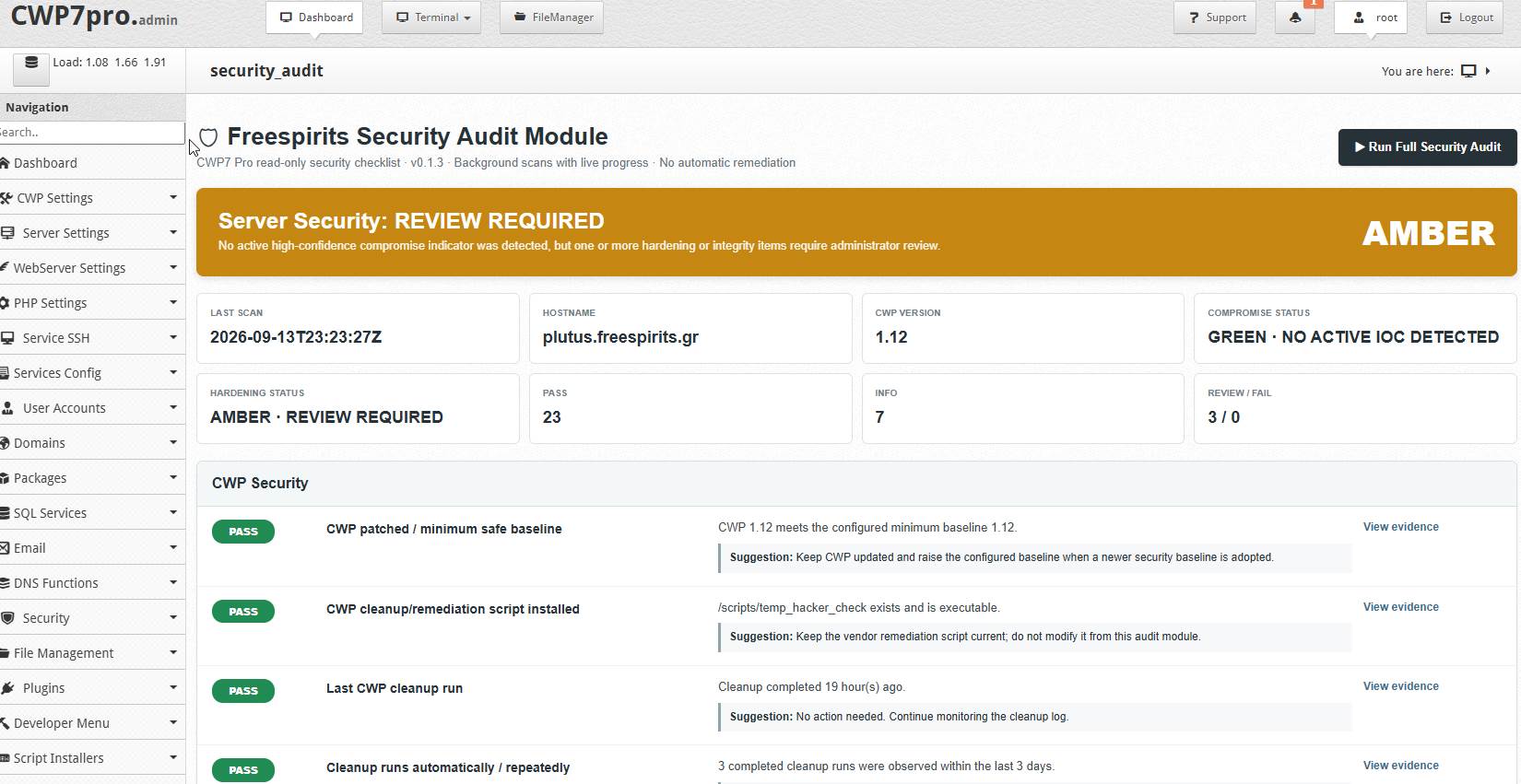
One Click. A Much Clearer Picture of Your Servidor.
Instead of manually remembering and executing numerous security commands, the administrator can launch a comprehensive assessment directly from CWP7.
Run Full Security Audit
↓
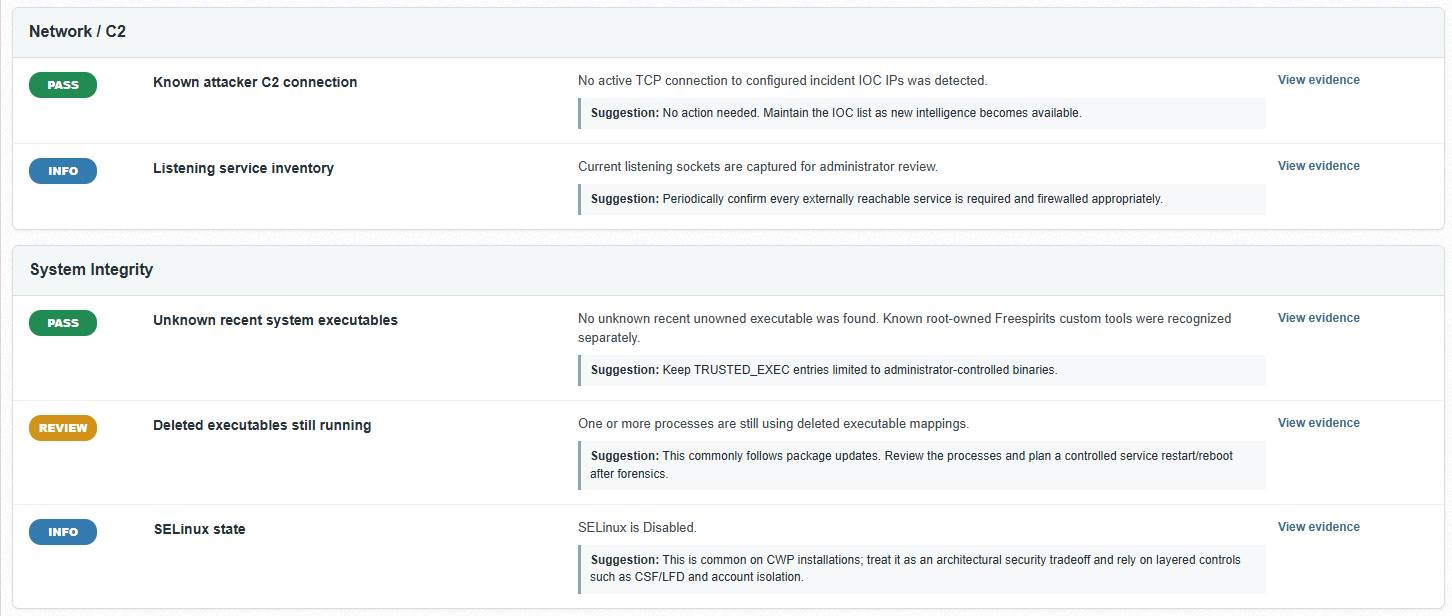
Results are organised into understandable statuses with evidence and practical guidance so the administrator can decide what actually requires action.
Not Every Warning Means Your Servidor Is Compromised
This is one of the most important differences between a useful security audit and a noisy security scanner.
A servidor might have:
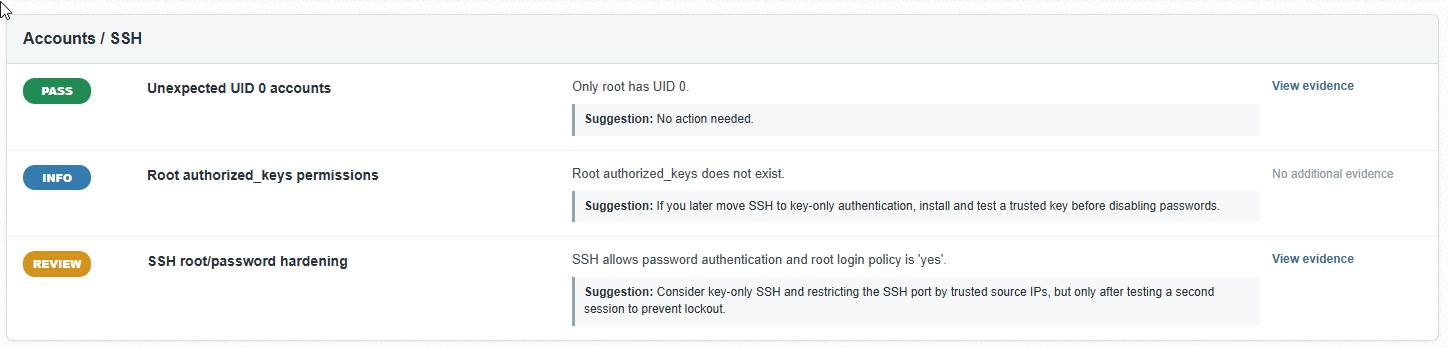
- SSH password authentication enabled
- SELinux disabled
- a service listening on a network interface
- root-operated internal CWP services
- older exploit evidence preserved in logs
These findings may deserve review, but they do not automatically mean an attacker currently controls the machine.
At the same time, findings such as:
- known malicious SSH keys
- suspicious persistence mechanisms
- active attacker C2 connections
- webshell signatures
- fake kernel-thread malware
- unauthorised UID 0 accounts
deserve a very different level of attention.
CWP7 Security Audit Module is designed to help distinguish between security hardening opportunities and evidence that may indicate an active compromise.
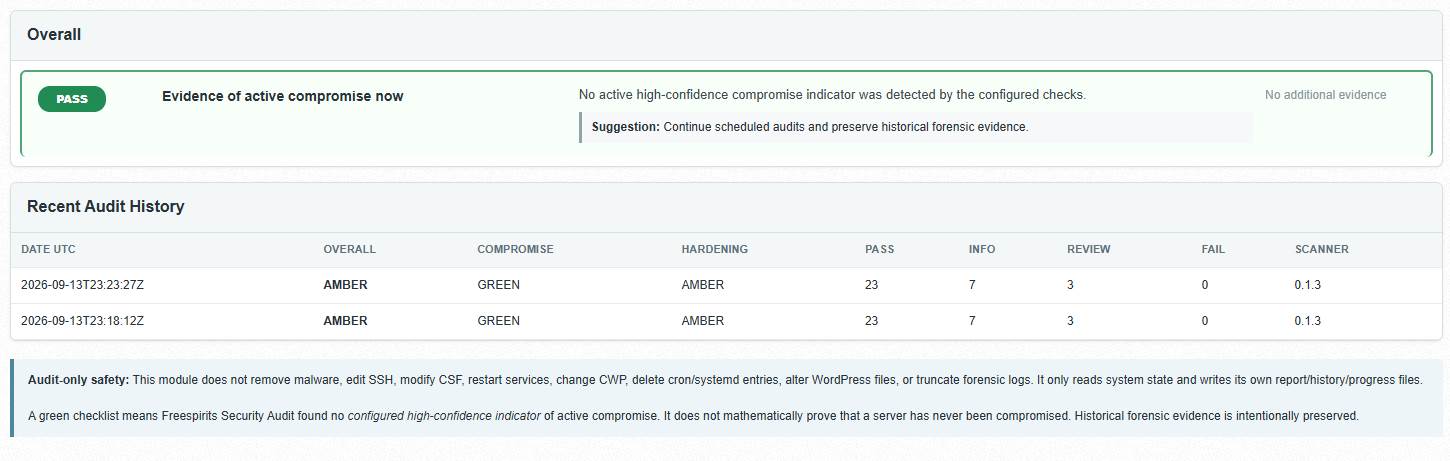
Compromise Status and Hardening Status Are Not the Same Thing
A servidor can be free from detected high-confidence compromise indicators while still having configuration improvements worth reviewing.
COMPROMISE STATUS
GREEN
No configured active IOC detected
HARDENING STATUS
AMBER
Security improvements worth reviewing
This distinction helps reduce unnecessary panic while ensuring genuine risks remain visible.
Designed Around Real CWP7 Servers
Generic Linux security scanners often lack context.
CWP7 servers have their own architecture, internal PHP-FPM services, API listeners, firewall configuration, alojamiento directories, WordPress environments, scheduled processes and servidor-management components.
A generic scanner may see unusual behaviour and immediately label it dangerous.
CWP7 Security Audit Module is designed with the CWP7 environment in mind.
For example, it can recognise legitimate internal CWP behaviour, understand the relationship between CSF and LFD, evaluate whether a listening service is actually exposed through the firewall and treat old exploit evidence differently from recent suspicious activity.
Context matters. The objective is useful security information — not hundreds of meaningless alerts.
Read-Only by Design
One of the strongest principles behind CWP7 Security Audit Module is simple:
An audit tool should not silently change the
servidor it is auditing.
The module does not automatically:
- delete suspicious files
- remove SSH keys
- terminate processes
- disable services
- modify firewall rules
- restart Apache or Nginx
- change CWP configuration
- alter SSH settings
- edit WordPress files
- remove cron jobs
- change systemd services
- truncate forensic logs
Instead, it tells the administrator:
What was found. Why it matters. What evidence supports the finding. What should be considered next.
Why Read-Only Security Matters on Production Alojamiento Servers
Production alojamiento environments contain customer websites, custom scripts, plugins, caching systems, cron jobs, integrations and application files that may look unusual to an automated scanner.
Automatically deleting or modifying something based only on a signature can create a second problem while trying to solve the first one.
CWP7 Security Audit Module keeps the administrator in control.
Investigate first. Review the evidence. Understand the context. Then decide whether action is required.
Why This Is Such a Powerful Tool for Administrators
Faster Investigation
Replace a long sequence of manual Linux commands with a structured security assessment from one interface.
Better Decisions
Separate genuine compromise indicators from configuration recommendations and informational findings.
Evidence on Demand
Inspect the evidence behind relevant findings instead of trusting an unexplained red warning.
Reduced False Positives
CWP7-aware logic provides more useful results than treating every unusual file, process or service as malicious.
Historical Awareness
Preserve past incident evidence without incorrectly presenting an old event as proof of an attack happening now.
Administrator Control
The module reports and explains. The administrator decides what should be changed.
A Broad Security Audit in One Module
The module brings together checks covering CWP security, system integrity, persistence, networking, web content, firewall configuration and servidor hardening.
| Security Area |
What Is Examined |
| CWP Security Baseline |
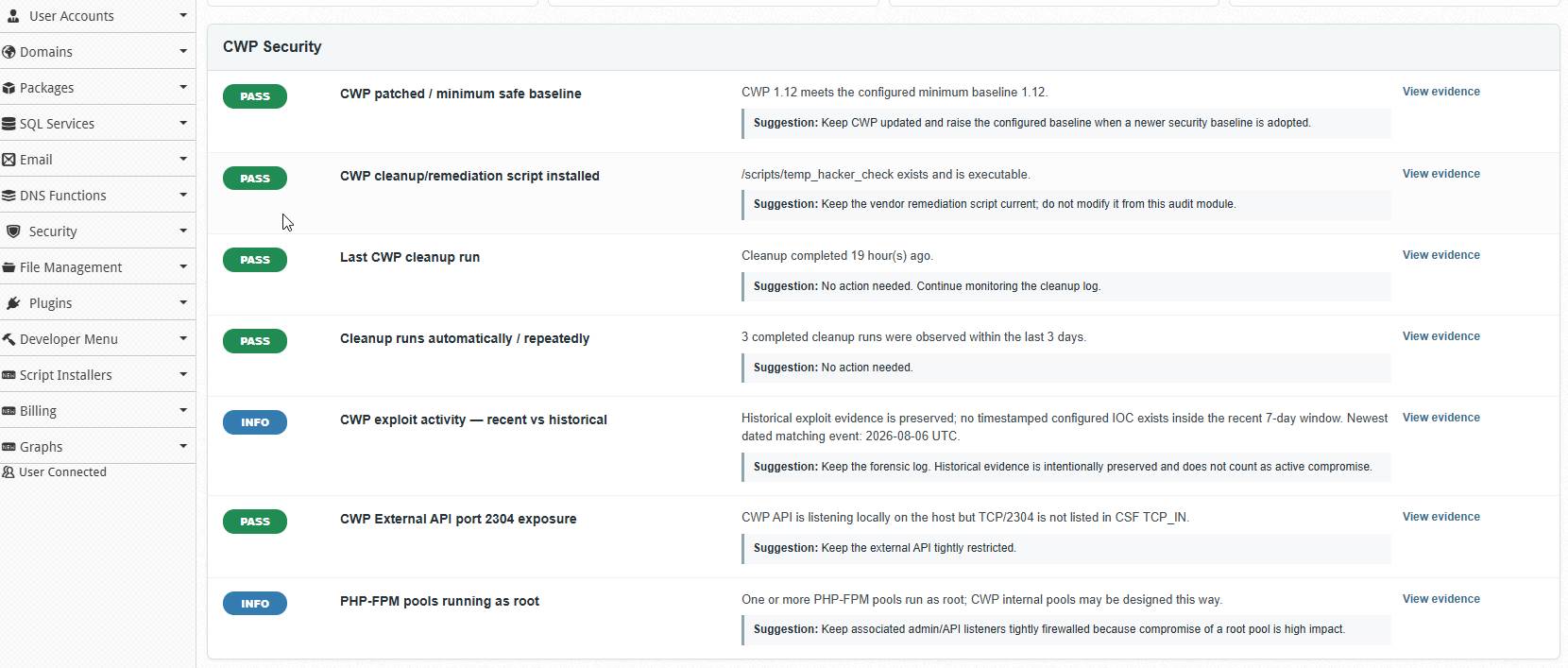
CWP version, remediation scripts, cleanup activity and exploit evidence. |
| CWP API Exposure |
Listening state and firewall exposure of sensitive CWP API services. |
| SSH Security |
Known malicious keys, root key permissions, root login and password authentication configuration. |
| Persistence Detection |
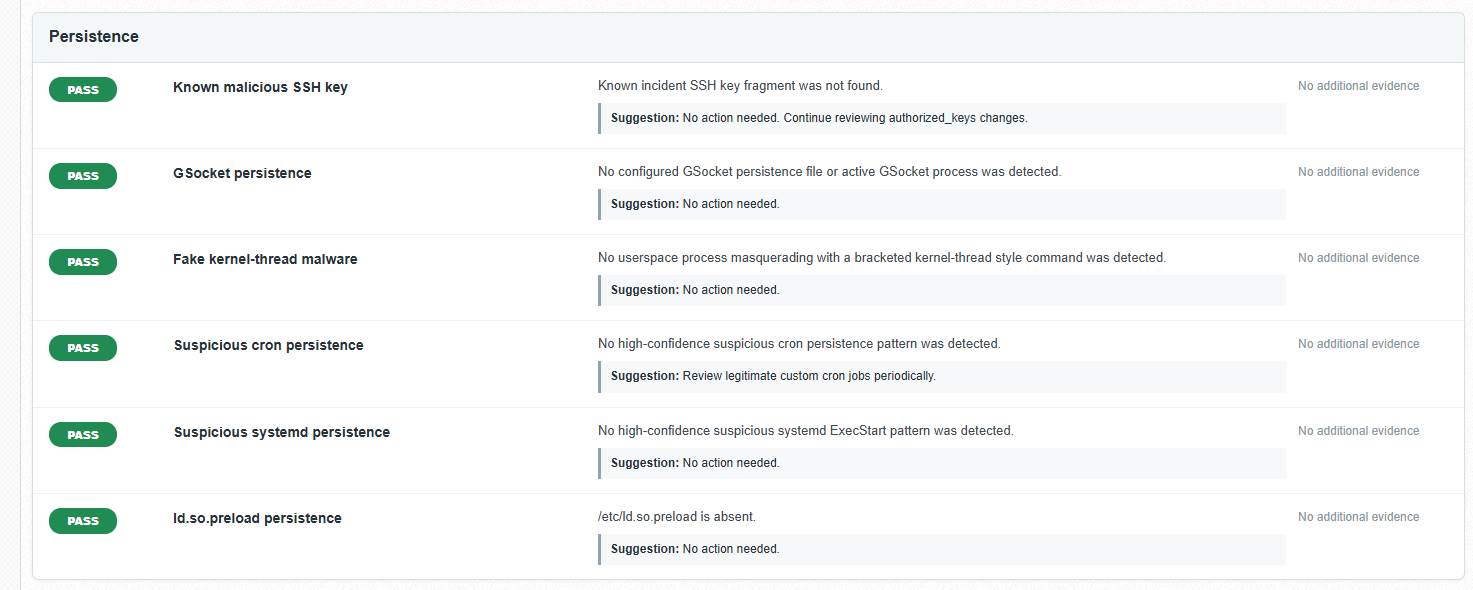
Cron jobs, systemd services, GSocket activity and ld.so.preload mechanisms. |
| Malware Indicators |
Fake kernel threads, malicious filenames, webshell patterns and known IOC activity. |
| Network Connections |
Listening services and active connections against configured attacker indicators. |
| Unknown Executables |
Recent executable files not owned by installed RPM packages. |
| Deleted Running Executables |
Processes still using binaries that have been deleted or replaced. |
| Privilege Review |
Unexpected UID 0 accounts and root-level security conditions. |
| Webroot Security |
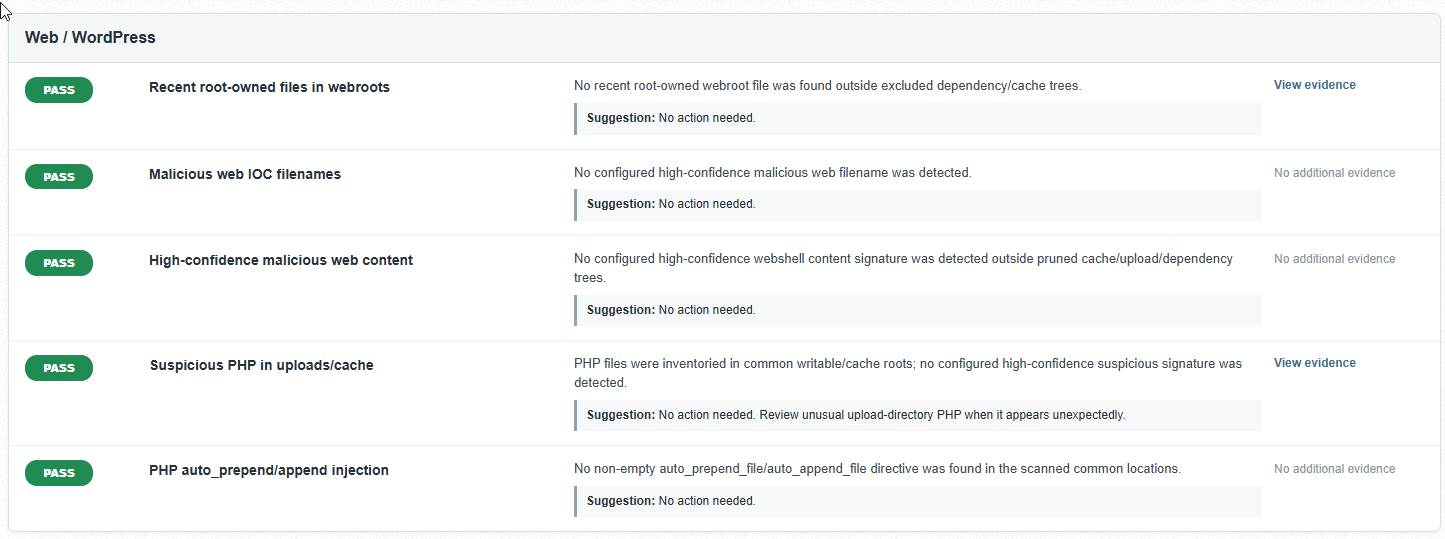
Root-owned web files, suspicious filenames, writable PHP locations and webshell signatures. |
| PHP Injection |
Suspicious auto_prepend_file and auto_append_file configuration. |
| Firewall State |
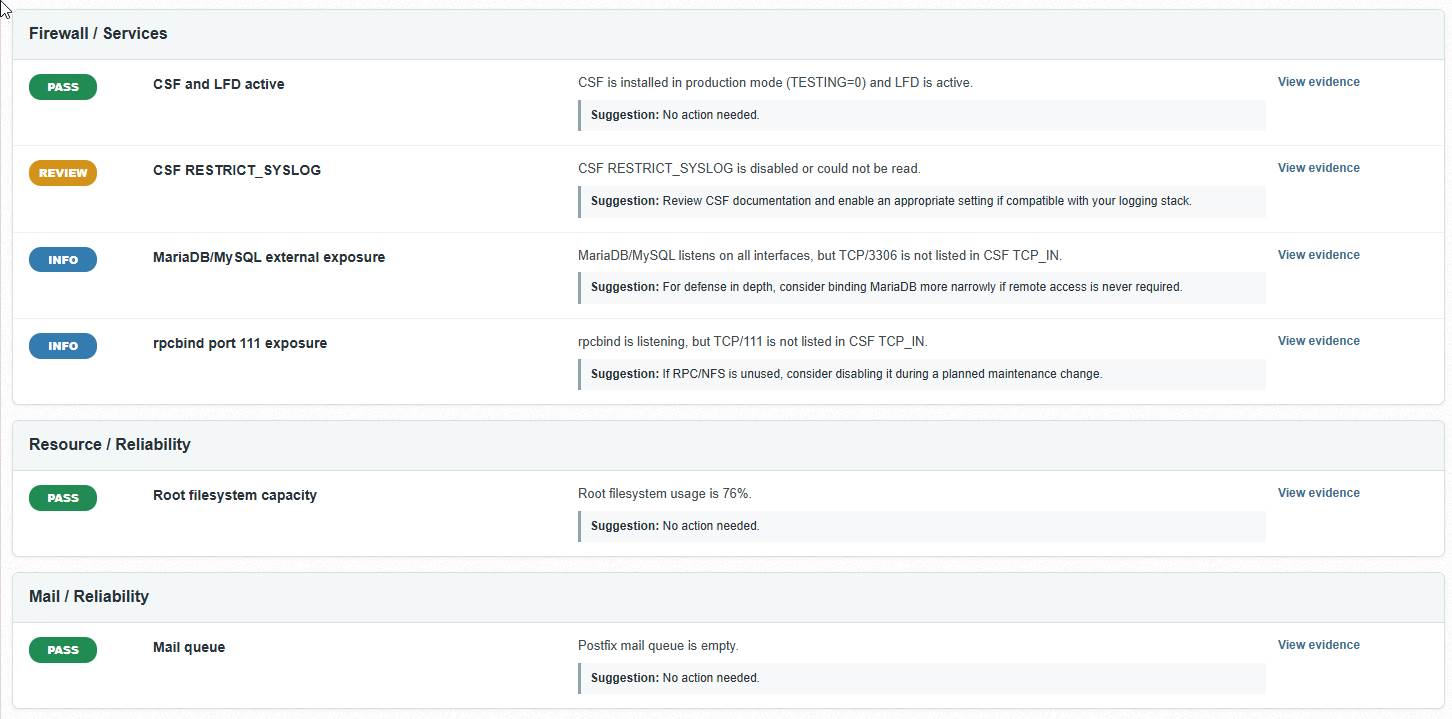
CSF production mode, LFD status and relevant firewall-hardening configuration. |
| Database Exposure |
MariaDB/MySQL listening behaviour and actual firewall exposure. |
| System Services |
rpcbind and other listening-service exposure requiring administrator review. |
| Servidor Health |
Root filesystem capacity and other conditions capable of affecting security and availability. |
| Mail Queue |
Abnormal Postfix queue accumulation that may indicate abuse or mail-system problems. |
Smarter Auditing for WordPress Alojamiento
WordPress alojamiento environments are particularly difficult for simplistic security scanners.
Plugins, caching engines, upload directories, vendor libraries and application frameworks can legitimately contain PHP files in locations that may initially appear suspicious.
Simply declaring every PHP file inside a directory named cache o uploads malicious would create a large number of false positives.
CWP7 Security Audit Module uses contextual checks and treats writable-directory PHP separately from high-confidence malicious signatures.
The goal is not to generate the largest report.
The goal is to generate a report an administrator can actually use.
Historical Evidence Stays Visible
Security evidence should not disappear simply because an incident happened in the past.
If older exploit activity remains in preserved logs, the module can report it as historical forensic information without automatically presenting it as proof of an active attack today.
INFO — Historical exploit evidence preserved; no configured IOC detected inside the recent activity window.
This provides valuable context while protecting administrators from misleading conclusions.
Preserve the Evidence
The module intentionally avoids deleting or truncating forensic logs.
Historical logs may become extremely important when investigating how an incident occurred, determining its timeline or comparing activity across multiple scans.
Background Scanning With Live Progress
Large alojamiento servers may contain many accounts and extremely large webroots.
A comprehensive audit should not force an administrator to keep a browser request open while thousands of files are examined.
The module therefore performs full audits in the background and can report the current scanning phase and progress through the CWP7 interface.
CWP Security Persistence Analysis System Integrity Web Inventory Web Content Writable PHP Firewall & Services Final Assessment
Expensive scanning phases can also use configured time limits so unusually large websites do not leave an audit running indefinitely.
A Warning Is More Useful When You Can See Why It Exists
Relevant findings include expandable evidence so the administrator can investigate directly from the CWP interface.
Instead of simply displaying:
REVIEW — Suspicious condition detected
the administrator can inspect supporting information and understand what was actually found.
Practical suggestions are also included where appropriate.
For example, SSH hardening guidance can recommend moving toward key-only authentication while reminding the administrator to verify a second working SSH session before disabling password access.
Likewise, a deleted executable may be explained as a condition that sometimes occurs after software updates rather than being automatically described as malware.
Useful security information without unnecessary panic.
Track Your Security Posture Over Time
A single scan tells you what the module found at one point in time.
Scan history makes that information more useful by allowing administrators to review how the servidor’s security posture changes over time and which scanner version generated each assessment.
This is especially valuable:
- after applying security patches
- after an incident
- after migrating to a new servidor
- after unusual CPU or network activity
- before onboarding an important customer
- after major configuration changes
- as part of regular servidor maintenance
Cómo CWP7 Security Audit Empowers Freespirits Network Alojamiento
For a alojamiento provider, security is not only about protecting one website.
It is about maintaining confidence in the entire servidor platform alojamiento customer websites, email services, applications and business-critical data.
CWP7 Security Audit Module gives Freespirits Network Alojamiento an additional internal verification layer directly inside the same CWP7 environment used to manage its servers.
Administrators can quickly run a structured audit without manually reproducing dozens of diagnostic commands.
Stronger Incident Verification
After suspicious activity, patching or remediation, the module provides another way to look for known indicators that still require attention.
Consistent Procedures
Security checks become repeatable instead of depending entirely on which Linux commands an administrator remembers at that moment.
Evidence-Based
Changelog
🛡️ Freespirits Security Audit Module for CWP7 Pro
Version 0.3.42 — Intelligent Servidor Security, Malware Detection & Automated Incident Response
Latest Release: v0.3.42
Release Date: October 23, 2026
Plataforma: CWP7 Pro / Compatible Linux Alojamiento Servers
License: Single-Servidor IP License
Edition: Professional Security & Incident Response
🚀 What’s New in Version 0.3.42
Smarter monitoring. Safer automatic protection. Better performance. Simpler administration.
Freespirits Security Audit has evolved into a comprehensive security auditing and incident-response solution designed for alojamiento administrators managing Joomla, WordPress, and multiple websites on CWP7 servers.
The latest release introduces full compatibility between Rapid Webshell Watch monitoring engines and automatic CSF protection, while preserving the advanced malware detection, forensic quarantine, email notifications, and performance improvements introduced throughout the v0.3 series.
✅ NEW: Automatic CSF Protection with Both Monitoring Engines
Previously, automatic malware containment and CSF protection required the inotify monitoring engine, even when the administrator had selected periodic polling.
Version 0.3.42 removes this limitation.
Administrators can now choose their preferred monitoring method:
- Event-Driven inotify: Near-real-time monitoring of suspicious filesystem changes with minimal scanning activity while idle.
- Periodic Polling: Scheduled, lightweight filesystem monitoring with automatic malware verification and conditional incident response.
Both engines now support the same guarded automatic-containment and direct-origin CSF IPv4 response policies.
The module automatically verifies the selected monitoring engine before enabling protection.
✅ NEW: Intelligent Polling Health Verification
When Polling is selected, Security Audit checks:
- Rapid Watch is enabled.
- The expected root-owned cron configuration is installed and protected.
- The system cron service is operating.
- A recent polling scan completed successfully.
- The monitoring interval matches the active configuration.
- At least one valid monitoring directory is available.
- Monitoring results are recent and reliable.
If any prerequisite fails, automatic CSF blocking remains disabled and the interface explains what needs attention.
No more forcing administrators to enable inotify just to activate CSF protection.
✅ IMPROVED: One-Click CSF & Malware Containment
The simplified security control allows administrators to enable automatic protection without navigating multiple complicated configuration options.
Before activation, the module verifies:
- Quarantine safety and file-integrity checks.
- CSF/LFD readiness.
- Controlled temporary IPv4 DENY insertion and removal.
- Selected Rapid Watch engine health.
- Required automatic-response safety conditions.
Once enabled, independently confirmed malicious files can be quarantined according to the configured policy.
An automatic CSF block is attempted only when the malicious activity can be strongly attributed to an eligible direct-origin IPv4 attacker.
🔥 Advanced Malware & Webshell Detection
Security Audit now recognizes a broader range of malicious PHP behaviors based on real-world security incidents investigated on production alojamiento servers.
Improved Detection Capabilities
- PHP command-execution webshells.
- Obfuscated command-execution functions.
- PHP backtick shell execution.
- Tiny PHP backdoors using short-echo syntax.
- Malicious PHP code disguised as
.txt files.
- Alternative executable PHP extensions.
- Unauthorized file-upload backdoors.
- Passwordless PHP file managers.
- Web-based terminal and command-execution interfaces.
- Suspicious executable files inside writable media directories.
- Known malicious SHA-256 signatures.
- Joomla SEO-spam and hidden-link injections.
- Malicious modifications to selected critical Joomla template files.
- Known YamiFool, QX, B33, and LinkForge-related attack patterns.
Behavior-based verification is combined with exact-hash intelligence, helping identify malicious variants without relying exclusively on filenames or previously known signatures.
The verifier uses static analysis and does not execute suspected malware.
Protection Against Disguised Webshells
Malicious code does not always use an obvious .php filename.
Security Audit includes targeted detection for PHP command-execution payloads hidden inside small text files and files using multiple extensions.
The detection engine examines relevant PHP syntax and behavior rather than automatically treating every unusual filename as malicious.
This reduces unnecessary false positives while improving coverage against disguised backdoors.
⚡ Rapid Webshell Watch — Lightweight Protection
Rapid Webshell Watch provides an efficient monitoring layer for identifying suspicious filesystem activity.
Event-Driven Monitoring
The inotify engine monitors selected high-risk directories for file-write and file-move events.
Benefits include:
- Near-real-time file-change detection.
- Low idle CPU consumption.
- Targeted verification instead of constant full scans.
- Optimized Joomla and WordPress writable-directory coverage.
- Resource-aware monitoring.
- Persistent monitoring status and activity statistics.
Periodic Polling
The polling engine provides an alternative for servers where persistent inotify monitoring is unsuitable.
Benefits include:
- Scheduled security checks.
- Configurable monitoring intervals.
- Bounded filesystem activity.
- Cron-based operation.
- Automatic verification of suspicious candidates.
- Compatibility with guarded containment and CSF response.
Both monitoring methods remain independently configurable.
Important: Polling detection depends on its configured interval, while inotify reacts to monitored filesystem events. Neither replaces a complete historical malware audit.
🛡️ Intelligent Malware Quarantine
Security Audit includes a forensic quarantine system designed to protect websites while preserving evidence.
Características principales
- Independent malicious-file verification.
- Exact SHA-256 validation before containment.
- Protection against changed files and symlink manipulation.
- Secure quarantine storage outside public webroots.
- Preserved forensic evidence.
- Administrator-controlled file restoration.
- Quarantine history and evidence manifests.
- Trusted exact-hash exceptions.
- Verification of previously quarantined payloads.
- Bulk quarantine for eligible confirmed-malicious files.
- Clear separation between confirmed, quarantined, missing, changed, and unresolved threats.
Automatic containment requires explicit administrator activation and passing safety checks.
Crucially, verified malicious files can be quarantined without identifying an attacker IP. IP attribution is required for firewall blocking, not for every malware containment decision.
🔥 CSF Firewall Integration & Intelligent IPv4 Response
Security Audit integrates with ConfigServer Security & Firewall (CSF) to provide guarded temporary IPv4 blocking.
CSF Protection Includes
- CSF/LFD availability checks.
- Production firewall readiness verification.
- Controlled temporary IPv4 DENY/cleanup self-tests.
- Public IPv4 validation.
- Protected and allowlisted IP exclusions.
- Administrator and SSH session protection.
- Strong malware-to-request attribution requirements.
- Direct-origin routing validation.
- Temporary block verification.
- Detailed BLOCKED, SKIPPED, and FAILED response history.
The module will not issue a ban merely because a suspicious request appeared near a malicious file modification.
Automatic blocking requires independently confirmed malware, successful containment, and strong evidence identifying the responsible source.
Security Audit focuses on direct-origin IPv4 protection. Cloudflare and CDN-level enforcement are handled separately by Freespirits Resource Shield.
🔍 Comprehensive Full Security Audits
The Full Security Audit examines servidor security, configuration, potentially malicious content, suspicious files, and relevant operational risks.
Enhanced Detection Coverage
Recent versions significantly improve inspection of:
- Joomla
images y media directories.
- WordPress upload and writable directories.
- Cache and temporary directories.
- Alternative PHP executable extensions.
- Known malicious file signatures.
- Suspicious PHP uploaders and command-execution scripts.
- Unexpected Joomla system-template modifications.
- Hidden SEO-spam injections.
- Suspicious campaign configuration artifacts.
The full audit uses resource and time budgets to reduce unnecessary load.
If a scan cannot complete its intended coverage, Security Audit reports incomplete inspection rather than incorrectly declaring the servidor clean.
Clear Security Classification
Findings are separated into meaningful categories:
- PASS: Check completed successfully.
- INFO: Informational security observation.
- REVIEW: Administrator attention recommended.
- FAIL: Confirmed or configured high-confidence security failure.
The overall dashboard provides a clear security summary, including AMBER and RED states when administrator attention is required.
🚨 Incident Center & Forensic Investigation
The Incident Center provides a centralized workflow for investigating security findings.
Incident Management Features
- Prioritized confirmed malware findings.
- File-specific risk classification.
- SHA-256 evidence.
- Relevant file metadata.
- Likely entry-point correlation.
- Investigation recommendations.
- Quarantine controls.
- Historical incident tracking.
- Verification scans after containment.
- Clear distinction between active and historical threats.
Improved Large-Incident Handling
Earlier releases exposed a limitation when servers contained hundreds of suspicious files.
The upgraded evidence system uses a complete structured incident ledger, preventing large incidents from losing detailed records because of report-size truncation.
Additional improvements include:
- Paginated incident records.
- Generation-matched audit evidence.
- Verified quarantine reconciliation.
- Detection of changed or missing files.
- Clear post-containment verification states.
- Separate reporting of historical threats and live confirmed malware.
A previously detected file is not automatically considered clean simply because it disappears from the filesystem.
📧 NEW: Malware-Safe Administrator Email Notifications
Version 0.3.41 introduced major improvements to security notification delivery.
Previously, detailed security reports could include suspicious payloads or URLs that triggered Gmail and other providers’ content-security filters.
Security Audit now uses sanitized, attachment-free security notifications by default.
Email Improvements
- Concise incident summaries.
- Servidor hostname and security status.
- Confirmed-threat counts.
- Quarantine results.
- Verification status.
- Scheduled security audit summaries.
- Sanitized Web Defense alerts.
- No raw malware code.
- No suspicious request URLs.
- No forensic malware attachments.
- No raw evidence paths or payloads.
Detailed evidence remains securely available inside CWP7 y el servidor’s forensic storage.
SMTP Delivery Diagnostics
The module also provides improved email delivery tracking:
- Individual Message-ID tracking.
- Per-recipient dispatch history.
- Local mail-servidor acceptance.
- Best-effort downstream Postfix delivery status.
- SMTP rejection and deferral information.
- Recognition of errors such as Gmail
552 5.7.0.
This helps distinguish successful local email submission from actual remote-servidor acceptance.
⚙️ Faster, Safer Installation & Automatic Updates
Version 0.3.40 resolved an important performance issue discovered on a production alojamiento servidor.
Previously, module updates could trigger servidor-wide campaign scans and automatic containment work during installation.
This behavior has been removed.
Improved Update Architecture
- No full malware scans during installation.
- No automatic mass quarantine during installation.
- Faster and more predictable deployment.
- Bounded managed-install execution.
- Installer health checks.
- Existing rollback protection.
- Preserved module configuration.
- Preserved forensic history.
- Preserved license and monitoring settings.
Historical campaign reconciliation is now separated from installation and can run as an optional, low-priority scheduled operation.
Signed Managed Updates
The module retains its secure managed-update framework:
- Digitally signed release verification.
- Secure package download.
- SHA-256 integrity checks.
- Installer preflight validation.
- Stable/Beta update channels.
- Optional unattended updates.
- Publisher-controlled staged rollouts.
- Automatic rollback after failed health checks.
- Update history and diagnostics.
🌐 Joomla + WordPress Web Defense
Security Audit includes a dedicated Web Defense component for deeper CMS-focused monitoring.
Capabilities include:
- Joomla and WordPress installation discovery.
- All-account or selected-account monitoring.
- Suspicious upload and write-request investigation.
- Recent malicious PHP file detection.
- Access-log delta processing.
- CMS-related file-injection alerts.
- Correlation with security findings.
- Administrator notifications.
- Configurable monitoring intervals.
- Resource-conscious monitoring scopes.
Web Defense can be enabled independently and is designed to complement Rapid Webshell Watch and the Full Security Audit.
🔐 Licensing, Administration & Security Controls
The existing professional licensing and security infrastructure remains supported.
Features include:
- Single-servidor IP licensing.
- License Manager integration.
- Independent license-security watchdog.
- License removal and deactivation alerts.
- License integrity monitoring.
- Optional independent administrator recipients.
- Managed update entitlement validation.
- Protected configuration handling.
- Existing settings preserved during upgrades.
Modern Administrator Dashboard
En CWP7 interface organizes security management into dedicated sections:
Dashboard · Checklist · Findings · Quarantine & Trust · Web Defense · Automation · Updates · License
Administrators can review important security information, enable monitoring, inspect incident evidence, manage quarantine, and configure security reports from one centralized interface.
📋 Version History — Detailed Changelog
v0.3.42 — Polling & inotify CSF Protection Compatibility
October 23, 2026
- Fixed automatic protection activation requiring inotify even when healthy polling was selected.
- Added polling-specific scheduler and execution health checks.
- Unified monitoring-engine readiness across GUI activation and CSF response eligibility.
- Improved protection-state information.
- Preserved all direct-origin IPv4 blocking safeguards.
v0.3.41 — Malware-Safe Email Reports
October 23, 2026
- Redesigned administrator security notifications.
- Removed dangerous forensic evidence from outgoing email.
- Added concise incident and scheduled-audit summaries.
- Added individual Message-ID tracking.
- Improved downstream Postfix SMTP rejection diagnostics.
- Preserved complete local incident evidence.
v0.3.40 — Fast Update & Installation Reliability
October 23, 2026
- Removed synchronous malware sweeps from installation.
- Removed install-time automatic quarantine operations.
- Disabled the unsafe legacy sweep-on-update behavior.
- Added bounded managed-install execution and rollback handling.
- Added optional low-priority, rotating account reconciliation, disabled by default.
- Improved suitability for multi-account alojamiento environments.
v0.3.39 — Hidden TXT Webshell Detection
October 23, 2026
- Added detection of small PHP command-execution payloads disguised as text files.
- Improved shared content verification between Full Audit and Rapid Watch.
- Added automatic verification RUNNING/COMPLETED/FAILED status reporting.
- Improved visibility while follow-up incident scans are active.
- Reduced the possibility of duplicate manual verification requests.
v0.3.38 — Large Incident Evidence Management
October 23, 2026
- Added complete structured incident evidence storage.
- Addressed truncated forensic findings on servers with hundreds of malicious files.
- Improved automatic responder access to complete evidence.
- Added paginated incident presentation.
- Improved follow-up verification workflow.
- Preserved exact-hash-safe bulk containment.
v0.3.37 — Tiny PHP Webshell & YamiFool Detection
October 23, 2026
- Added token-based identification of backtick command execution.
- Improved detection of PHP short-echo shells.
- Enhanced direct and obfuscated upload-backdoor recognition.
- Added false-positive safeguards for benign strings and comments.
- Improved Rapid Watch candidate verification.
v0.3.36 — Incident Reconciliation & Quarantine Integrity
October 23, 2026
- Improved distinction between live and historical findings.
- Added live-file SHA-256 revalidation.
- Improved missing/changed-file reporting.
- Extended quarantine-manifest reconciliation.
- Verified preserved forensic payload hashes.
- Improved verification options for unresolved incidents.
v0.3.35 — Advanced Webshell Behavior Detection
October 23, 2026
- Improved detection of malicious PHP file managers.
- Added stronger classification of command-execution backdoors.
- Enhanced detection of dynamically selected and obfuscated PHP functions.
- Improved high-confidence quarantine without requiring attacker-IP correlation.
- Preserved independent CSF IP-attribution safeguards.
v0.3.34 — Automatic Protection Activation Fix
October 23, 2026
- Corrected the one-click protection activation action.
- Fixed protection controls being ignored by the action router.
- Improved automatic safety-test execution.
- Added clearer activation-failure reporting.
- Preserved licensing, CSRF, quarantine, and firewall safety checks.
v0.3.33 — Full Audit Malware Detection Improvements
October 23, 2026
- Expanded writable-media malware inventory.
- Added Joomla
images y media coverage.
- Improved detection of known webshell copies.
- Added independent suspicious-PHP verification.
- Improved SEO-spam and Joomla template-injection findings.
- Added explicit warnings when inspection coverage is incomplete.
v0.3.32 — Joomla SEO-Injection Protection
October 23, 2026
- Added detection informed by a real Joomla SEO-spam incident.
- Enhanced monitoring of critical Joomla system templates.
- Improved identification of hidden links and suspicious link-data files.
- Added bounded inspection of pre-existing suspicious PHP candidates.
- Preserved non-destructive handling of critical Joomla core files.
v0.3.31 — Simplified CSF & Containment
October 23, 2026
- Introduced simplified single-control protection activation.
- Automated required quarantine and CSF safety checks.
- Improved protection-state reporting.
- Reduced manual configuration complexity.
- Preserved conservative direct-origin IPv4 response rules.
v0.3.30 — Direct-Origin IPv4 Response Improvements
October 22–23, 2026
- Focused Security Audit’s CSF integration on direct-origin IPv4 protection.
- Improved HTTP and HTTPS access-log correlation.
- Added explicit reasons when automatic blocking is skipped.
- Improved verification of direct-origin domain routing.
- Preserved CDN and IPv6 exclusions.
v0.3.29 — Verified CSF IPv4 Enforcement
October 2026
- Added controlled temporary CSF IPv4 DENY and cleanup testing.
- Added safer activation prerequisites.
- Improved public-IP and administrator protection.
- Tightened file-upload request correlation.
- Improved mixed DNS/proxy detection.
- Added verification that temporary firewall rules appear in CSF.
v0.3.28 — IPv4-Specific Protection Readiness
October 2026
- Improved IPv4-specific readiness validation.
- Added stricter handling of IPv6 visitors.
- Enhanced direct-origin domain verification.
- Improved firewall readiness diagnostics.
- Prevented unsupported IPv4 attribution from IPv6 observations.
v0.3.27 — Quarantine & CSF Readiness
October 2026
- Introduced integrated quarantine and CSF safety self-tests.
- Added protected-IP validation.
- Improved real visitor-IP verification.
- Introduced clearer firewall readiness states.
- Strengthened safeguards before automatic blocking.
v0.3.26 and Earlier — Lightweight Monitoring Foundation
September–October 2026
- Introduced persistent Rapid Webshell Watch.
- Added optimized inotify and polling monitoring.
- Improved file-event processing and debounce behavior.
- Added resource-safety monitoring.
- Expanded malicious PHP detection.
- Developed the forensic quarantine workflow.
- Improved scheduled full audits and administrator reports.
- Added targeted Web Defense monitoring.
- Expanded incident investigation and correlation.
- Introduced signed managed updates and automatic update monitoring.
- Improved licensing and independent security notifications.
✅ Why Upgrade to v0.3.42?
Version 0.3.42 brings together the most important improvements from the recent development cycle:
Smarter detection: Recognizes additional malware families, hidden PHP backdoors, suspicious file-write behavior, and malicious content in unexpected file types.
Better protection: Supports independently verified malware containment and guarded direct-origin CSF IPv4 response.
Flexible monitoring: Works with either inotify or periodic polling without requiring administrators to change their preferred monitoring engine.
Lower administrative overhead: Simplified activation, improved reporting, and clearer incident history.
More reliable updates: Installation is separated from expensive security scans and containment operations.
Safer communication: Concise security notifications help avoid transmitting malware evidence through email.
Better forensic confidence: Incident records distinguish confirmed live malware, verified quarantine, historical threats, and unresolved findings.
Designed for Alojamiento Professionals
Freespirits Security Audit is particularly suitable for:
- CWP7 servidor administrators.
- Página web alojamiento providers.
- Joomla and WordPress alojamiento environments.
- Multi-account VPS and dedicated servers.
- Agencies maintaining client websites.
- Administrators seeking practical malware investigation and response tools.
Important Security Notes
Automatic containment is optional and requires successful safety checks. CSF automatic blocking applies only when a strongly attributed public IPv4 attacker can be safely enforced at a verified direct-origin servidor. Cloudflare/CDN protection is handled separately.
Security scanning and quarantine reduce exposure but cannot guarantee that every threat will be detected, every attacker blocked, or an already compromised website fully restored. Updates, access control, backups, vulnerability remediation, and incident investigation remain essential.
Freespirits Security Audit v0.3.42 — Detect intelligently. Investigate confidently. Contain safely. Protect your alojamiento infrastructure.
Developed by Freespirits — Professional Security Tools for CWP7 Administrators.