Descripción
CWP7 Turbo Manager – Intelligent Performance Auditing, Optimization & Monitoring for CWP7 Servers
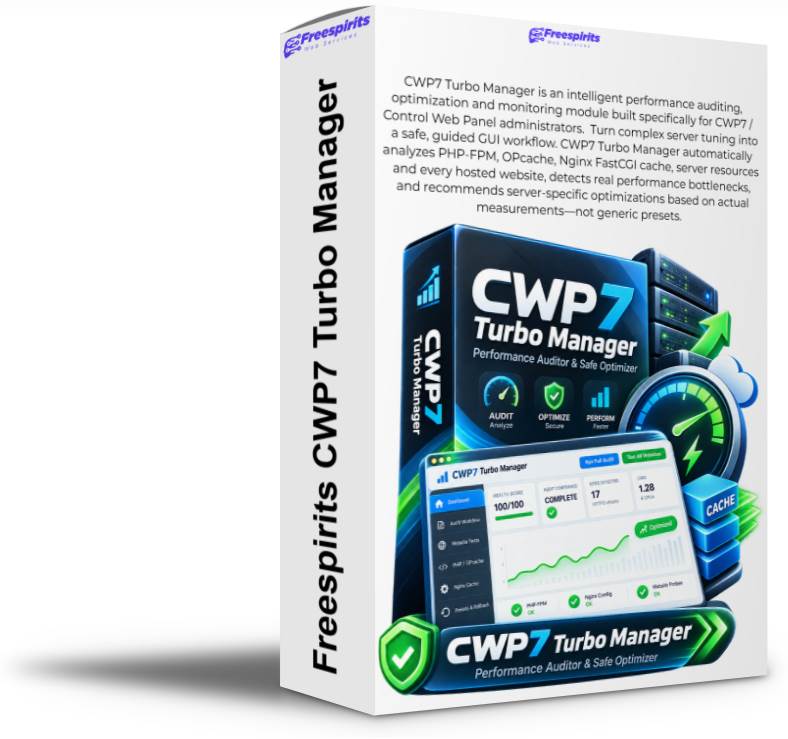
CWP7 Turbo Manager is a professional performance auditing, optimization, monitoring, regression-testing, and servidor-tuning module designed specifically for administrators running CWP7 / Control Web Panel servers.
If you manage websites, WordPress installations, WooCommerce stores, PHP applications, Joomla websites, alojamiento accounts, PHP-FPM pools, Nginx FastCGI cache, or multiple customer websites from CWP7, then you already know how difficult performance troubleshooting can become.
A servidor may look healthy at first glance while PHP OPcache is completely exhausted. A WordPress site may load quickly from cache but take several seconds when a visitor uses a tracking URL. A WooCommerce website may accidentally cache a functional query. PHP-FPM may be active but configured inefficiently. Nginx may appear correctly configured while certain cache-key rules create duplicated cache entries or even cache collisions. One website may be fast while another account quietly consumes almost all available OPcache memory.
Finding these problems manually normally requires SSH access, Linux knowledge, PHP-FPM inspection, OPcache debugging, Nginx configuration analysis, repeated CURL tests, WordPress knowledge, cache investigation, command-line tools, and a great deal of time.
CWP7 Turbo Manager brings that entire workflow directly inside the CWP7 administrator panel.
Instead of guessing, CWP7 Turbo Manager measures the servidor, analyzes the results, identifies real bottlenecks, explains what is happening, proposes safe performance presets, shows the exact changes before they are applied, creates backups, validates the configuration, reloads only the required services, runs website regression tests, and provides rollback protection.
The goal is simple:
Measure first. Understand the bottleneck. Optimize only when justified. Verify the result. Protect the servidor.
¿Por qué? CWP7 Turbo Manager Is Different
Many so-called servidor optimization tools use generic recommendations such as:
“You have 8 GB RAM, therefore set OPcache to 512 MB.”
That approach ignores the real workload of the servidor.
CWP7 Turbo Manager takes a completely different approach. It measures actual resource usage before recommending a change.
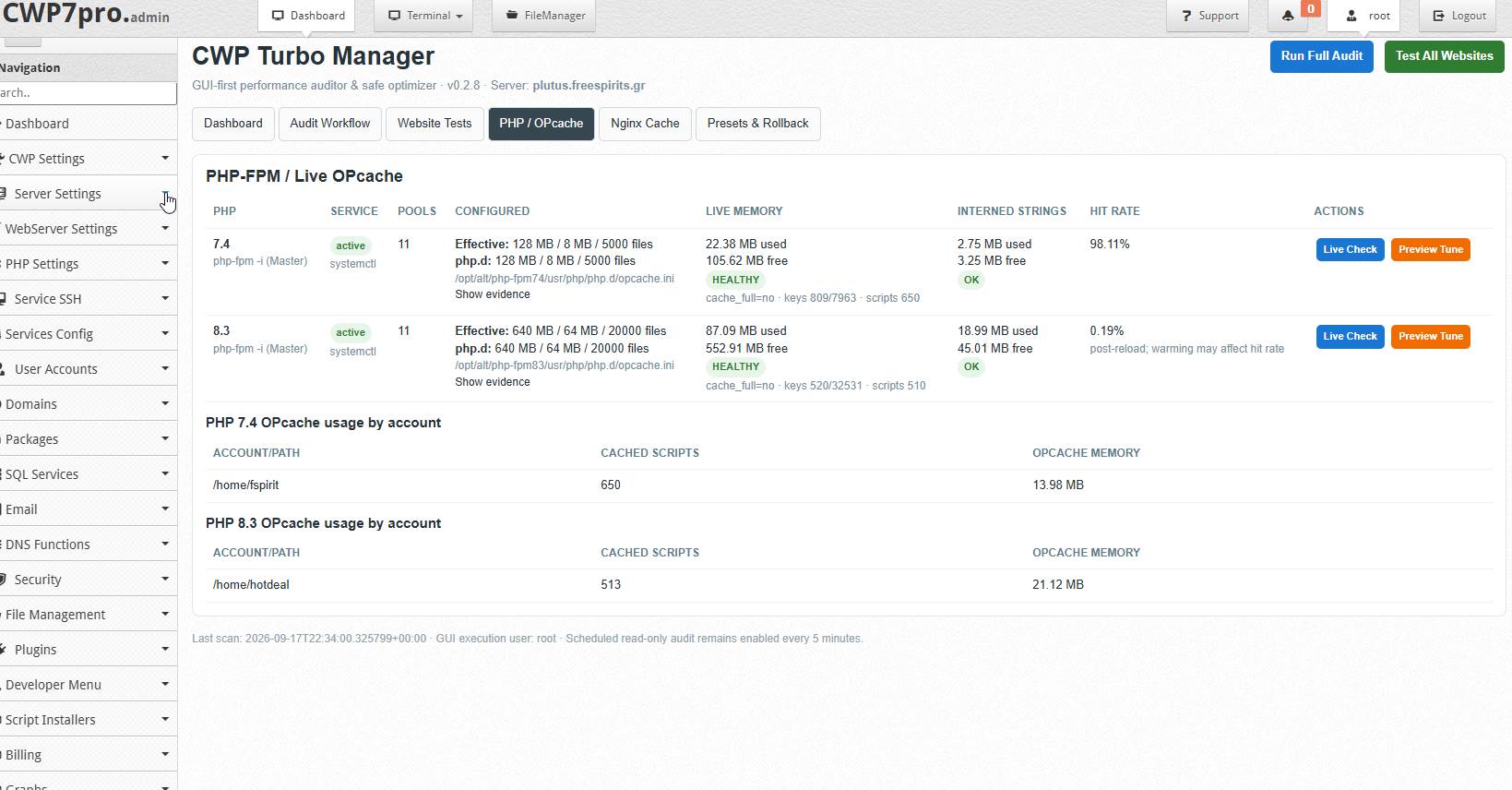
For example, the module can detect that PHP 8.3 is configured with 128 MB OPcache memory, that all 128 MB are being used, that no memory remains free, that the interned strings buffer is full, and that thousands of PHP scripts are competing for limited cache space.
At the same time, PHP 7.4 on the same servidor may use only 22 MB of its available 128 MB and therefore require absolutely no optimization.
CWP7 Turbo Manager understands the difference.
It does not blindly optimize every PHP version simply because a generic rule says that bigger values are better.
This makes the module particularly valuable for real alojamiento environments where multiple PHP versions, customer accounts, WordPress sites, WooCommerce stores, Laravel applications, Joomla websites, and custom PHP software may coexist on the same machine.
Complete CWP7 Performance Command Center
After installation, CWP7 Turbo Manager appears directly inside the CWP7 administrator interface.
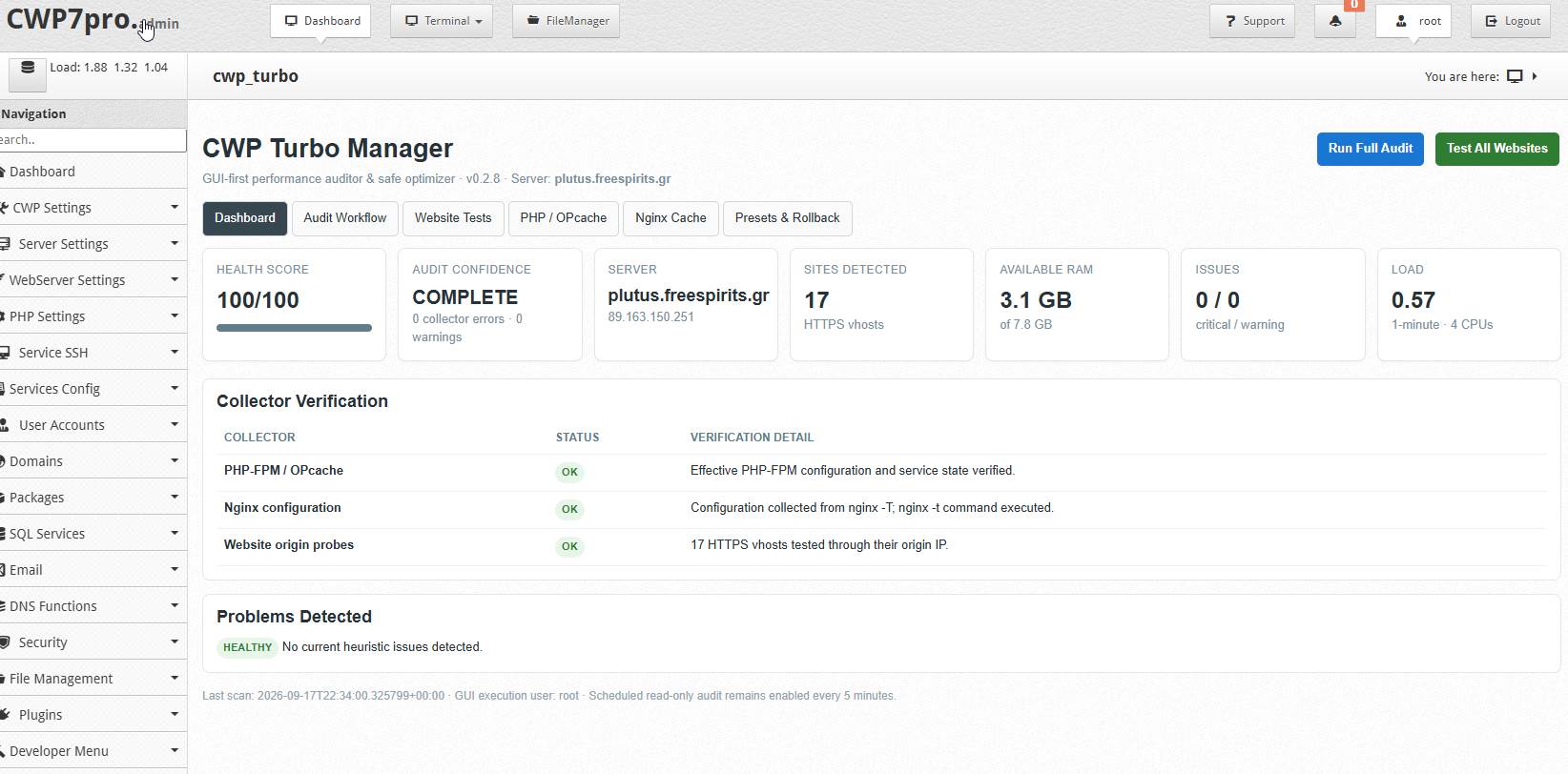
The administrator receives a centralized performance dashboard containing servidor health information, website measurements, PHP-FPM status, OPcache statistics, Nginx FastCGI cache information, recommendations, regression testing, backup history, rollback controls, licensing information, post-optimization follow-up monitoring, and downloadable performance reports.
Normal operation is GUI-first.
You do not need to repeatedly connect through SSH just to inspect OPcache, run website tests, analyze Nginx caching, or verify a performance change.
CWP7 Turbo Manager provides a guided workflow designed to help both experienced servidor administrators and alojamiento professionals who want a safer and faster way to maintain CWP7 systems.
Guided Performance Workflow
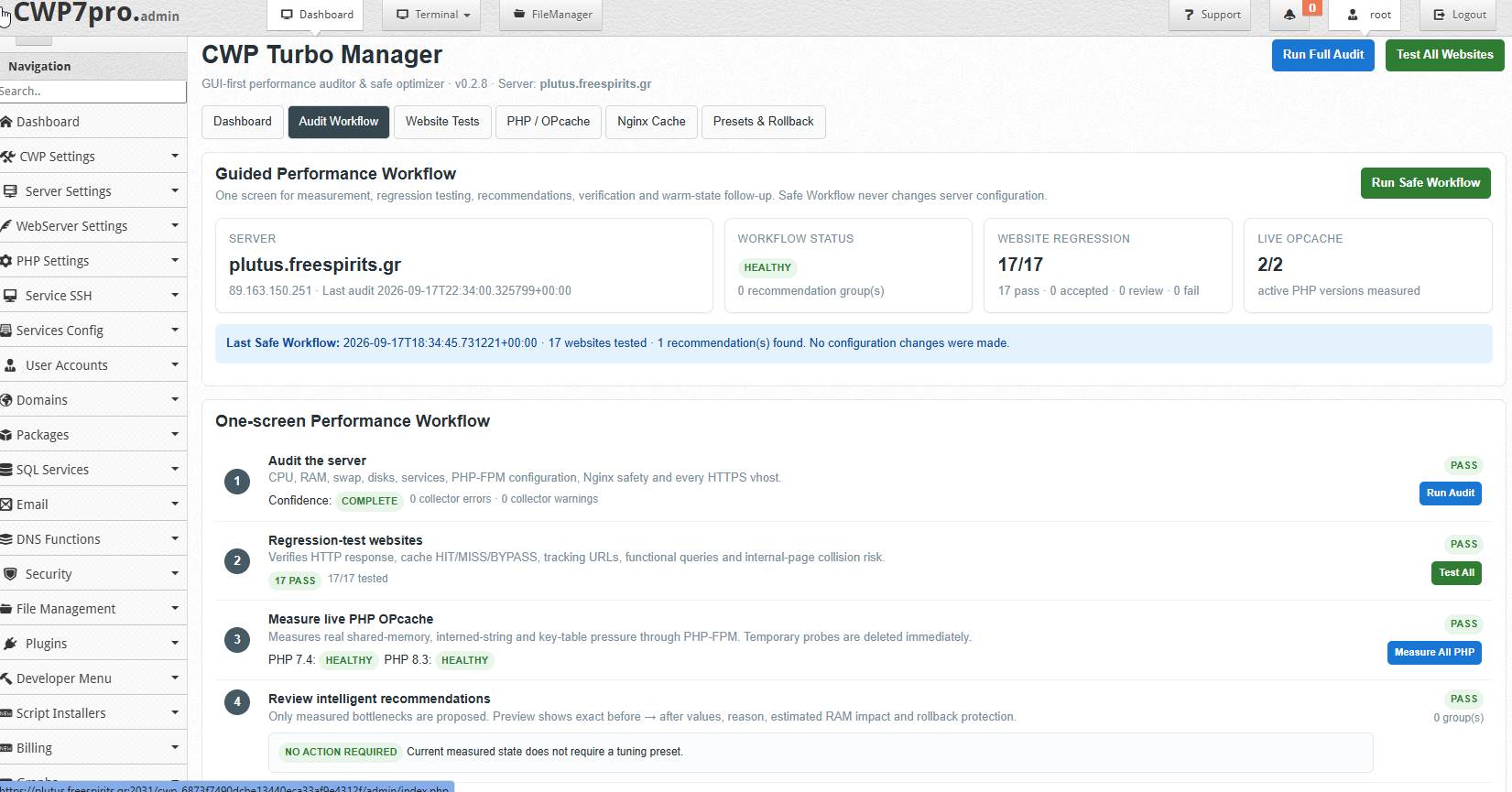
One of the most powerful features of CWP7 Turbo Manager is the Guided Performance Workflow.
The administrator can run a complete safe workflow that performs read-only measurements across the servidor before any configuration change is proposed.
The workflow includes:
- Servidor Audit – checks CPU load, RAM, swap, disk usage, PHP-FPM services, OPcache configuration, Nginx configuration and detected HTTPS websites.
- Website Regression Testing – verifies HTTP responses, cache HIT/MISS/BYPASS behavior, tracking URLs, functional query strings and potential cache collisions.
- Live OPcache Measurement – measures real shared-memory usage, interned strings, key-table pressure, cached scripts and hit rate.
- Intelligent Recommendations – recommendations are generated only when a measurable bottleneck exists.
- Safe Preset Preview – shows current values, proposed values, expected impact and exact configuration changes.
- Apply + Validate + Verify – backs up the original configuration, validates syntax, reloads the appropriate service and verifies the result.
- Post-Tune Monitoring – performs scheduled follow-up checks to ensure the optimization remains healthy after the system has warmed up.
The safe workflow itself does not silently modify the servidor.
Configuration changes always require administrator approval.
Intelligent PHP OPcache Analysis
PHP OPcache is one of the most important performance components on a modern PHP alojamiento servidor, but it is also frequently misunderstood.
A servidor can have plenty of free system RAM while OPcache itself is completely full.
CWP7 Turbo Manager measures OPcache directly through the appropriate PHP-FPM environment and displays detailed information for every detected PHP version.
The module can analyze:
OPcache memory usage, free memory, cache-full status, interned strings usage, free interned-string memory, cached script count, cached key count, maximum key capacity, OPcache hit rate, and memory consumption by alojamiento cuenta.
This is particularly important because OPcache pressure does not always mean that the main memory allocation is too small.
The module can distinguish between different types of pressure, including:
memory pressure, interned strings pressure, key-table pressure, fragmentation/allocation pressure, and healthy OPcache conditions.
This prevents unnecessary tuning.
For example, if OPcache still reports a full state while significant memory remains available, the real bottleneck may be the accelerated-file/key table rather than memory itself.
CWP7 Turbo Manager can identify that condition and recommend increasing opcache.max_accelerated_files instead of blindly doubling the OPcache memory allocation.
OPcache Usage by Alojamiento Cuenta
On shared or multi-account servers, it is extremely useful to know which accounts are consuming the PHP cache.
CWP7 Turbo Manager can display OPcache usage by account or filesystem path.
An administrator may discover that one WordPress installation is using more than 100 MB of OPcache while several other sites use only a few megabytes.
This information can help identify large frameworks, plugin-heavy WordPress installations, WooCommerce stores, development projects, abandoned applications, or websites that may need further optimization.
Instead of viewing OPcache as a mysterious servidor-wide number, administrators can understand where the resources are actually being consumed.
Smart OPcache Tuning
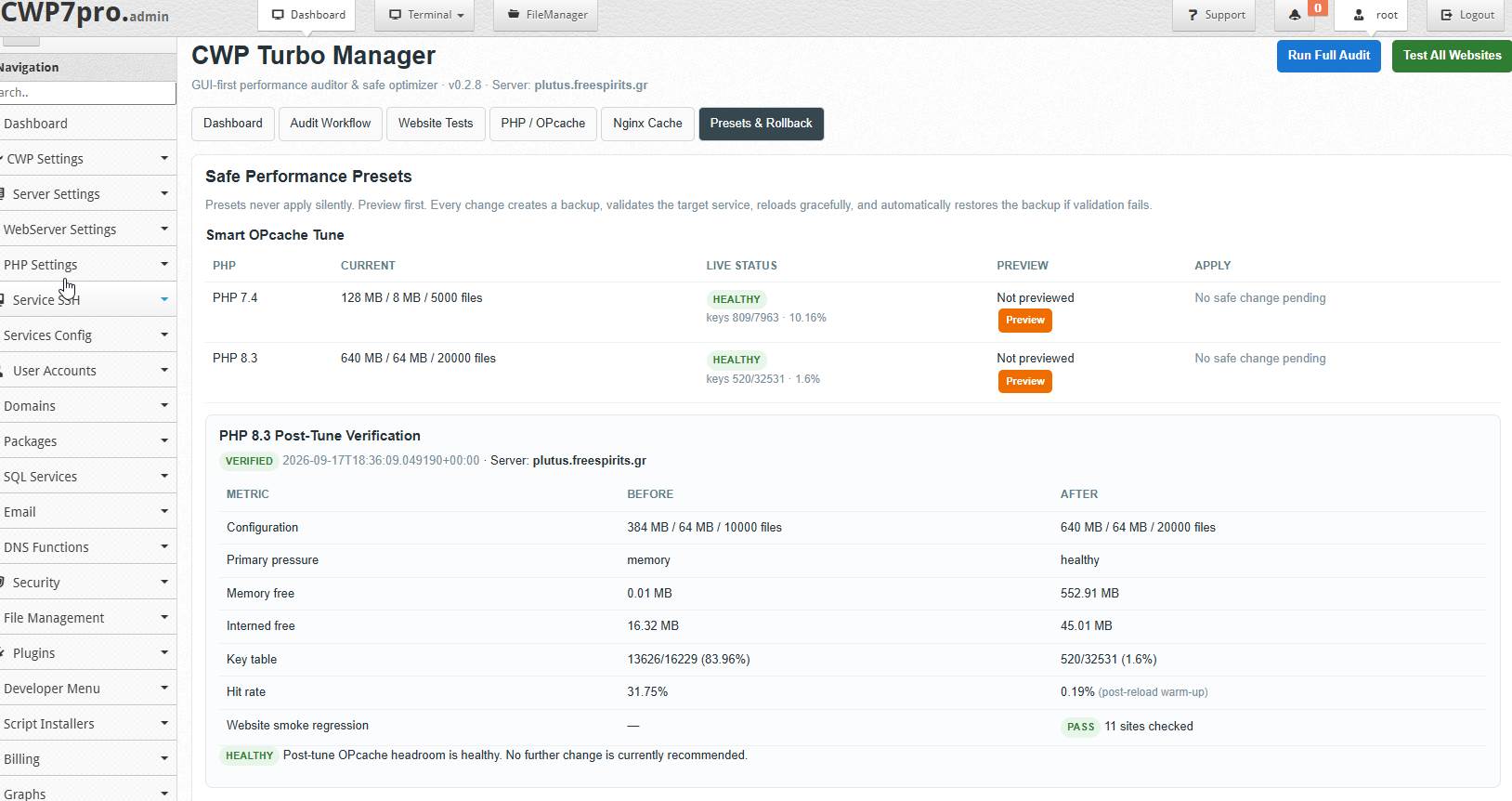
When CWP7 Turbo Manager detects genuine OPcache pressure, it can generate a Smart OPcache Tune recommendation.
The preset is based on the live servidor measurements rather than copied from another servidor or selected from a generic template.
Before anything is changed, the administrator sees:
Current configuration → live measurements → detected bottleneck → recommended configuration → reason for the recommendation → estimated resource impact.
The Apply button becomes available only after the recommendation has been previewed.
The reviewed preview is bound to the current servidor identity, PHP version and configuration fingerprint.
If the underlying configuration changes before the administrator presses Apply, CWP7 Turbo Manager refuses to apply the stale preview and requires a fresh measurement.
This is an important protection for production servers.
Automatic Backup and Rollback Protection
Servidor optimization should never mean editing configuration files without a recovery path.
Before applying a supported performance preset, CWP7 Turbo Manager creates a backup of the original configuration.
After writing the proposed configuration, it validates the target service before completing the operation.
For PHP-FPM tuning, the appropriate PHP-FPM configuration is validated before the service is reloaded.
For Nginx changes, CWP7 Turbo Manager runs an Nginx configuration syntax test before reload.
If validation fails, the change is not allowed to remain active.
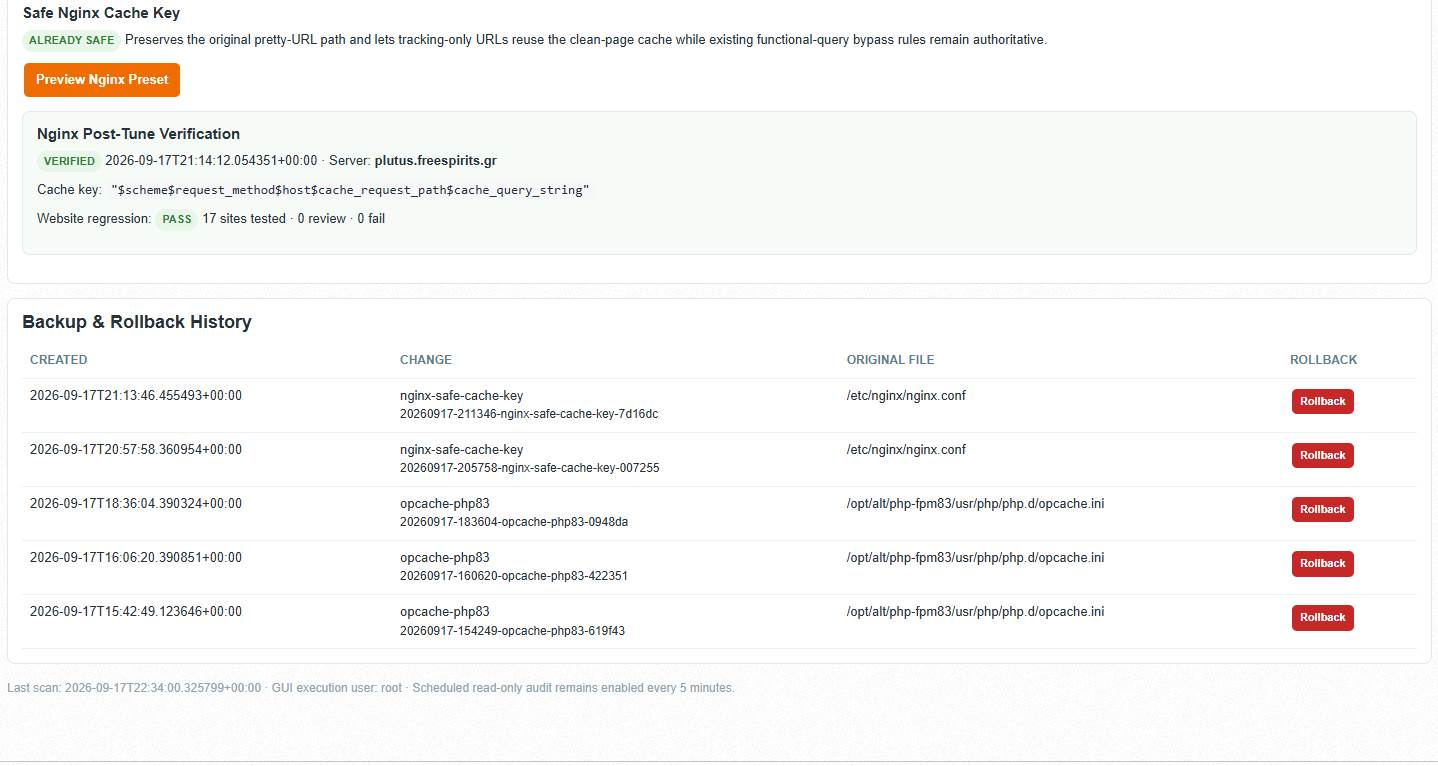
Backup records are shown inside the GUI under Backup & Rollback History.
Administrators can see which component was modified, when the change occurred, which original file was backed up, and use the Rollback control if necessary.
Advanced Nginx FastCGI Cache Analysis
FastCGI caching can make WordPress websites extremely fast, but an incorrect cache configuration can create serious problems.
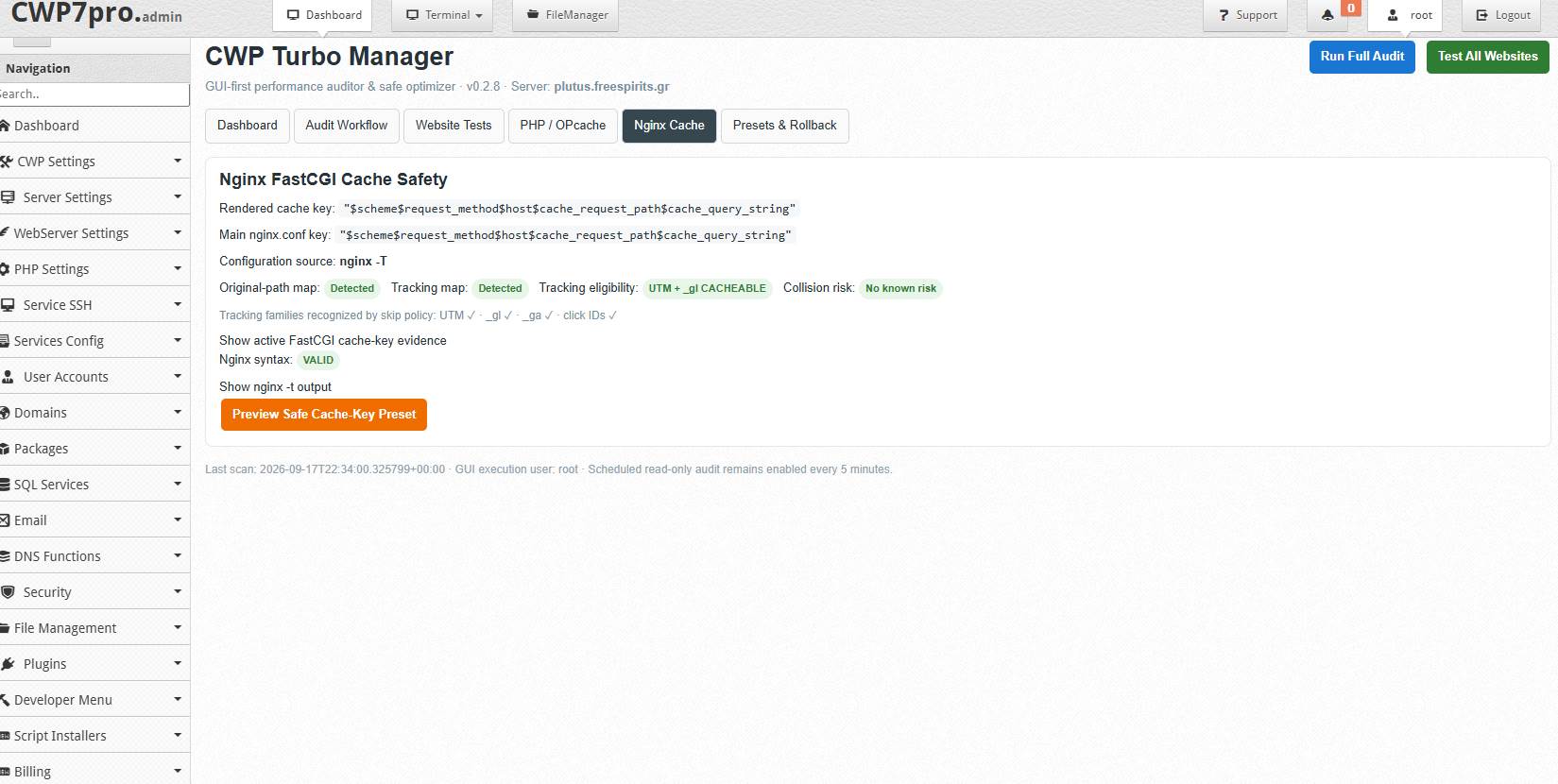
CWP7 Turbo Manager analyzes the active Nginx configuration and looks specifically at FastCGI cache-key behavior, query-string handling, internal WordPress/Joomla rewrites, and tracking URL normalization.
One particularly dangerous configuration pattern involves using a cache key based on the internally rewritten $uri.
WordPress pretty URLs can internally resolve through /index.php. If the wrong cache key is used, different public pages can potentially collapse onto the same cached object.
CWP7 Turbo Manager is designed to recognize this type of risk.
The module can use the original browser-request path while still allowing safe tracking-only URLs to reuse the clean-page cache.
Tracking URL Cache Normalization
Modern advertising, analytics, marketing por correo electrónico and affiliate systems frequently add tracking parameters to URLs.
Examples include:
utm_source, utm_medium, utm_campaign, _gl, _ga, gclid, fbclid, msclkid, gbraid, wbraid and similar identifiers.
On many Nginx configurations, every URL containing a query string bypasses FastCGI cache.
This means that a perfectly cacheable WordPress page can suddenly require a full PHP/MySQL request simply because the visitor arrived from Google Ads, Facebook, an email campaign or Google Analytics cross-domain tracking.
CWP7 Turbo Manager can detect this behavior and identify it as a performance opportunity.
The Safe Nginx preset can normalize tracking-only URLs so they reuse the same clean-page cache while preserving bypass behavior for functional parameters.
That means:
/page/?utm_source=facebook can safely reuse the clean /page/ cache, while requests such as ?s=search, ?orderby=price, ?add-to-cart=123, cart sessions, WooCommerce checkout requests and logged-in WordPress sessions remain protected by the existing bypass logic.
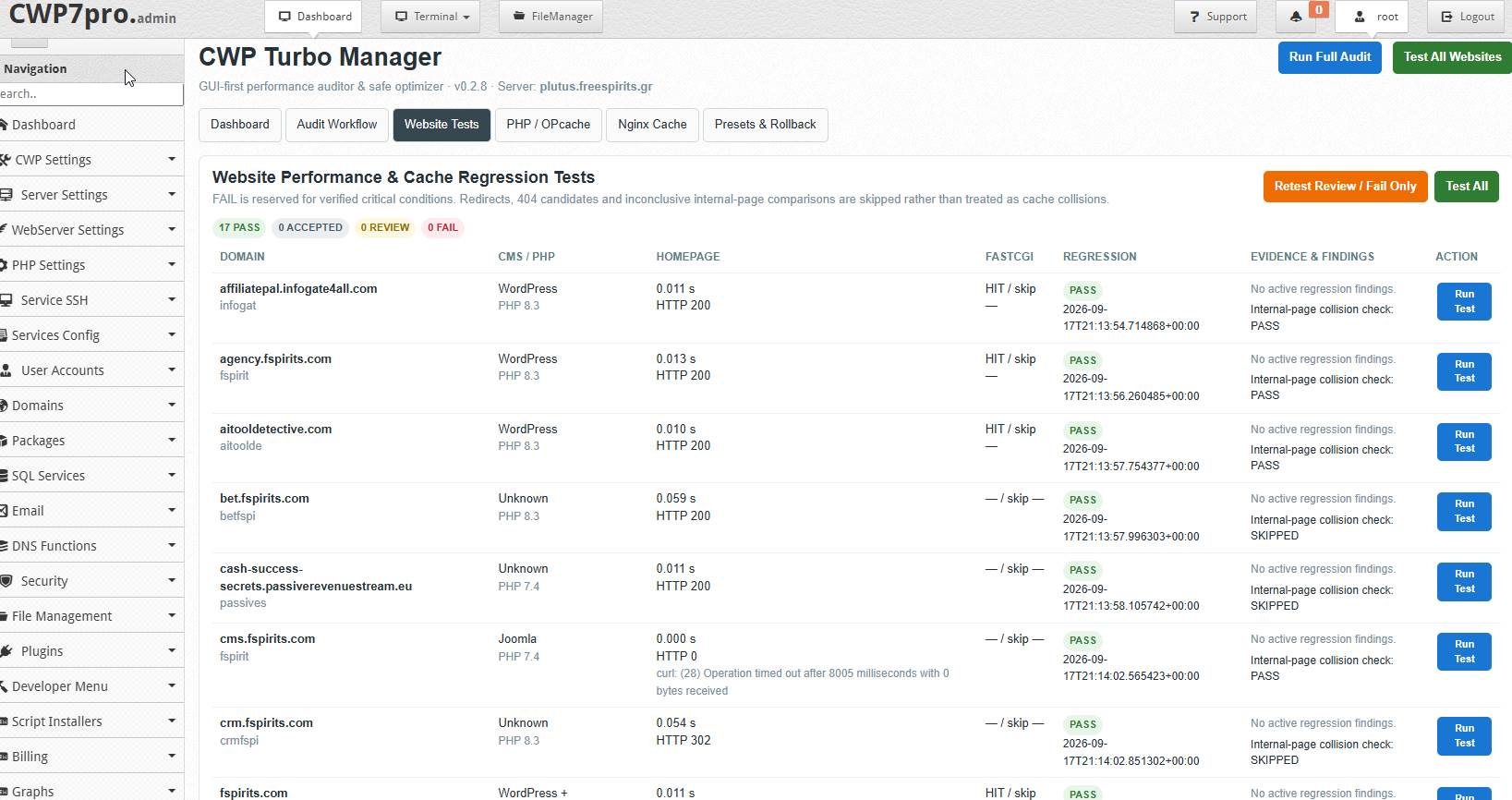
Website Performance & Cache Regression Testing
Changing servidor performance settings without testing websites afterward is risky.
CWP7 Turbo Manager therefore includes a dedicated Website Performance & Cache Regression Test sistema.
Each detected HTTPS virtual host can be tested directly against the origin servidor.
The system can inspect:
HTTP response, homepage TTFB, FastCGI cache status, tracking parameter behavior, functional query bypass behavior, internal-page cache separation, and potential cache collisions.
Results are classified intelligently as:
PASS, REVIEW, ACCEPTED, FAIL or SKIPPED/INCONCLUSIVE.
A red FAIL is reserved for verified critical conditions.
Redirects, 404 candidates, empty pages and inconclusive internal-page comparisons are not automatically treated as cache-collision failures.
This dramatically reduces false positives.
CMS-Aware Testing
CWP7 Turbo Manager attempts to identify common application types including WordPress, WooCommerce, Joomla and other PHP applications.
This matters because not every website should be judged using the same criteria.
A static or cached WordPress homepage may respond in a few milliseconds, while a dynamic Laravel application or CRM may intentionally bypass FastCGI caching.
A WooCommerce site requires additional caution because cart, checkout, session cookies, product filtering, sorting and add-to-cart functionality must never be blindly cached.
CWP7 Turbo Manager focuses on evidence rather than forcing every application into one generic configuration.
Scheduled Post-Tune Follow-Up
A configuration change can appear successful immediately after it is applied but behave differently after the servidor has handled real traffic.
CWP7 Turbo Manager therefore includes scheduled post-optimization follow-up monitoring.
Successful supported tuning operations can schedule additional measurements after approximately:
10 minutes, 1 hour and 24 hours.
These follow-ups can verify that OPcache remains healthy, key-table utilization remains reasonable, interned strings have sufficient headroom, websites continue responding, and no new regression appears after normal traffic has warmed the servidor.
This is particularly useful for OPcache because the hit rate immediately after a PHP-FPM reload can be misleading. The cache has just been recreated and needs time to warm.
CWP7 Turbo Manager distinguishes post-reload warm-up measurements from mature cache behavior.
Professional Before & After Verification
After a successful optimization, the GUI can display a before-and-after verification report.
For example:
Before: OPcache full, zero free memory, key table 100% utilized.
After: hundreds of megabytes free, key-table utilization reduced dramatically, interned strings with safe headroom, websites regression-tested successfully.
This gives the administrator evidence that a change actually resolved the measured problem.
The goal is not simply to modify configuration values.
The goal is to prove that the modification produced a healthier servidor state.
Exportable Performance Reports
CWP7 Turbo Manager Commercial Edition can generate professional performance reports for administrators and customers.
Reports can include servidor identity, audit information, website response times, regression status, OPcache measurements, Nginx configuration status, before-and-after tuning results, follow-up verification and rollback information.
Reports can be generated in self-contained HTML format and structured JSON format.
The HTML version can be opened in a browser and printed or saved as PDF.
This makes the reporting system useful for:
alojamiento companies, managed servidor providers, web developers, WordPress maintenance businesses, agencies, internal IT departments, customer support teams and technical consultants.
An administrator can optimize a customer’s servidor and provide clear evidence of what was detected, what was changed and whether performance improved.
Commercial CD-Key Licensing
The commercial edition of CWP7 Turbo Manager includes CD-key licensing designed to work with the Freespirits licensing infrastructure.
The license can be configured as a lifetime, single-servidor activation suitable for a one-time-payment commercial product.
Activation takes place directly from the CWP7 Turbo Manager GUI.
The administrator enters the license key and the module communicates securely with the Freespirits License Manager API.
The license system can validate the product identifier, activation limit, servidor binding and signed license token.
CWP7 Turbo Manager verifies signed license information locally and supports an offline grace period so a temporary licensing-servidor outage does not interfere with the customer’s websites or servidor services.
The licensing layer controls premium module functionality only.
It never shuts down customer websites simply because the licensing service cannot temporarily be reached.
Designed for Production Servers
CWP7 Turbo Manager has been designed around one principle:
performance optimization must never become a bigger risk than the performance problem itself.
For this reason, supported configuration changes follow a controlled process:
Measure → Preview → Backup → Validate → Apply → Reload → Verify → Regression Test → Follow Up → Rollback if necessary.
The module does not intentionally expose unrestricted root-shell execution through its interface.
Its administrator actions are designed around predefined operations and controlled performance workflows.
Who Should Use CWP7 Turbo Manager?
CWP7 Turbo Manager is ideal for anyone responsible for maintaining a CWP7 servidor.
This includes alojamiento providers, freelance system administrators, web developers, WordPress professionals, WooCommerce developers, digital agencies, managed alojamiento businesses, affiliate marketers running multiple websites, SaaS owners, PHP developers, IT professionals and administrators managing customer websites.
If your CWP7 servidor hosts more than one website, the module can save significant troubleshooting time.
If your servidor hosts dozens of websites, it can become an essential daily administration tool.
Why Every CWP7 Administrator Should Have It
CWP7 itself provides powerful servidor-management functionality, but performance troubleshooting frequently requires information from many different layers.
You may need to inspect PHP-FPM, OPcache, Nginx, WordPress, WooCommerce, query strings, servidor RAM, service state, website response times and application-specific behavior before you understand why a website is slow.
CWP7 Turbo Manager brings those performance signals together.
Instead of asking:
“Why is this website slow?”
you can see:
“PHP 8.3 OPcache is full, the key table is exhausted, one account consumes most of the cache, functional queries correctly bypass FastCGI, tracking URLs unnecessarily miss cache, and the database is not the immediate bottleneck.”
That level of information changes servidor administration completely.
It replaces guesswork with evidence.
It can reduce unnecessary plugin disabling, unnecessary database tuning, unnecessary servidor upgrades and risky configuration experiments.
It also provides something equally important: confidence.
When a change is made, CWP7 Turbo Manager can verify that websites still work afterward.
Installation
Installation is intentionally simple.
Upload the downloaded CWP7 Turbo Manager ZIP package directly into the /root directory of your CWP7 servidor.
For version 1.0.0, the uploaded file would normally be:
/root/cwp-turbo-manager-v1.0.0.zipConnect to your servidor as root and run the following commands:
cd /root && \
rm -rf /root/cwp-turbo-manager-v1.0.0 && \
unzip -o /root/cwp-turbo-manager-v1.0.0.zip -d /root/ && \
cd /root/cwp-turbo-manager-v1.0.0 && \
chmod +x install.sh && \
bash install.sh
The installer places the required CWP7 module files, Turbo Manager engine, configuration files and supporting services into their appropriate locations.
After installation, refresh the CWP7 administrator panel.
You should see:
CWP7 Turbo Manager
inside the administrator interface.
From that point onward, normal performance auditing and optimization are performed through the GUI.
License Activation
Open:
CWP7 Turbo Manager → License
Enter your commercial CD-key and select Activate.
After successful activation, the commercial features become available for the licensed servidor.
The license is intended to be bound to the authorized servidor according to the licensing terms of the purchased product.
Recommended First Run
After activation, the best starting point is the Guided Performance Workflow.
Open:
CWP7 Turbo Manager → Audit Workflow
and select:
Run Safe Workflow
The module will perform the safe read-only analysis first.
Review the servidor audit, website regression results and live PHP OPcache measurements.
If the module identifies an optimization opportunity, preview the recommendation before applying anything.
Only apply a preset after reviewing the proposed change.
CWP7 Turbo Manager will then handle the supported backup, validation, service reload and post-change verification process.
Upgrading CWP7 Turbo Manager
Future versions can be installed over the existing installation using the same general process.
For example, after uploading a newer ZIP package into /root, extract the package and run its installer.
The commercial installer is designed to preserve relevant configuration, licensing state, performance history, rollback records and existing servidor settings where appropriate.
Always use the installation instructions included with the specific version you download.
No More Blind Servidor Optimization
CWP7 Turbo Manager is not designed to make random configuration changes just to make values larger.
It is designed to answer the questions that matter:
Is PHP actually under pressure?
Which PHP version is affected?
Is OPcache memory full?
Are interned strings exhausted?
Is the key table full?
Which account consumes the cache?
Are websites actually using FastCGI cache?
Are tracking parameters destroying cache efficiency?
Do functional WooCommerce queries remain bypassed?
Did the optimization make the servidor healthier?
Did all websites remain operational afterward?
Can the previous configuration be restored?
CWP7 Turbo Manager is built to provide those answers.
Turn CWP7 Performance Management Into a Controlled Workflow
Managing a production servidor should not require remembering dozens of commands every time a performance problem appears.
It should not require manually copying values between terminals, PHP configuration files, website tests and notes.
It should not require applying a change and hoping nothing breaks.
CWP7 Turbo Manager transforms servidor optimization into a structured process that can be repeated consistently across different CWP7 servers.
Each servidor is measured independently.
Recommendations are generated from that servidor’s own workload.
Configuration changes are previewed.
Original files are backed up.
Services are validated.
Websites are regression-tested.
Follow-up checks verify that the improvements remain healthy.
And the entire process is visible directly from the CWP7 administrator interface.
CWP7 Turbo Manager – Measure. Optimize. Verify. Protect.
CWP7 Turbo Manager gives CWP7 administrators something that is normally available only through lengthy manual servidor investigation: a clear understanding of where performance is being lost and a controlled way to improve it.
Whether you manage one important production servidor or operate multiple customer alojamiento environments, CWP7 Turbo Manager helps you find hidden PHP bottlenecks, improve cache efficiency, protect WordPress and WooCommerce behavior, monitor performance after changes and keep a complete history of important optimization actions.
Instead of reacting to complaints that a website “feels slow,” you can measure what is happening.
Instead of copying generic optimization settings from tutorials, you can tune the actual workload.
Instead of changing Nginx and hoping every site still works, you can run automated regression tests.
Instead of forgetting what configuration existed before an optimization, you have rollback history.
Instead of checking once and assuming the servidor will remain healthy, you have scheduled post-tune verification.
And instead of performing the same complicated command-line investigation again and again, you have a dedicated CWP7 performance management interface.
If you administer CWP7 servers professionally, CWP7 Turbo Manager is designed to become one of the first modules you open when performance matters.
Audit smarter. Tune safely. Verify every change. Keep your CWP7 servers running at their best with CWP7 Turbo Manager.